
Price check
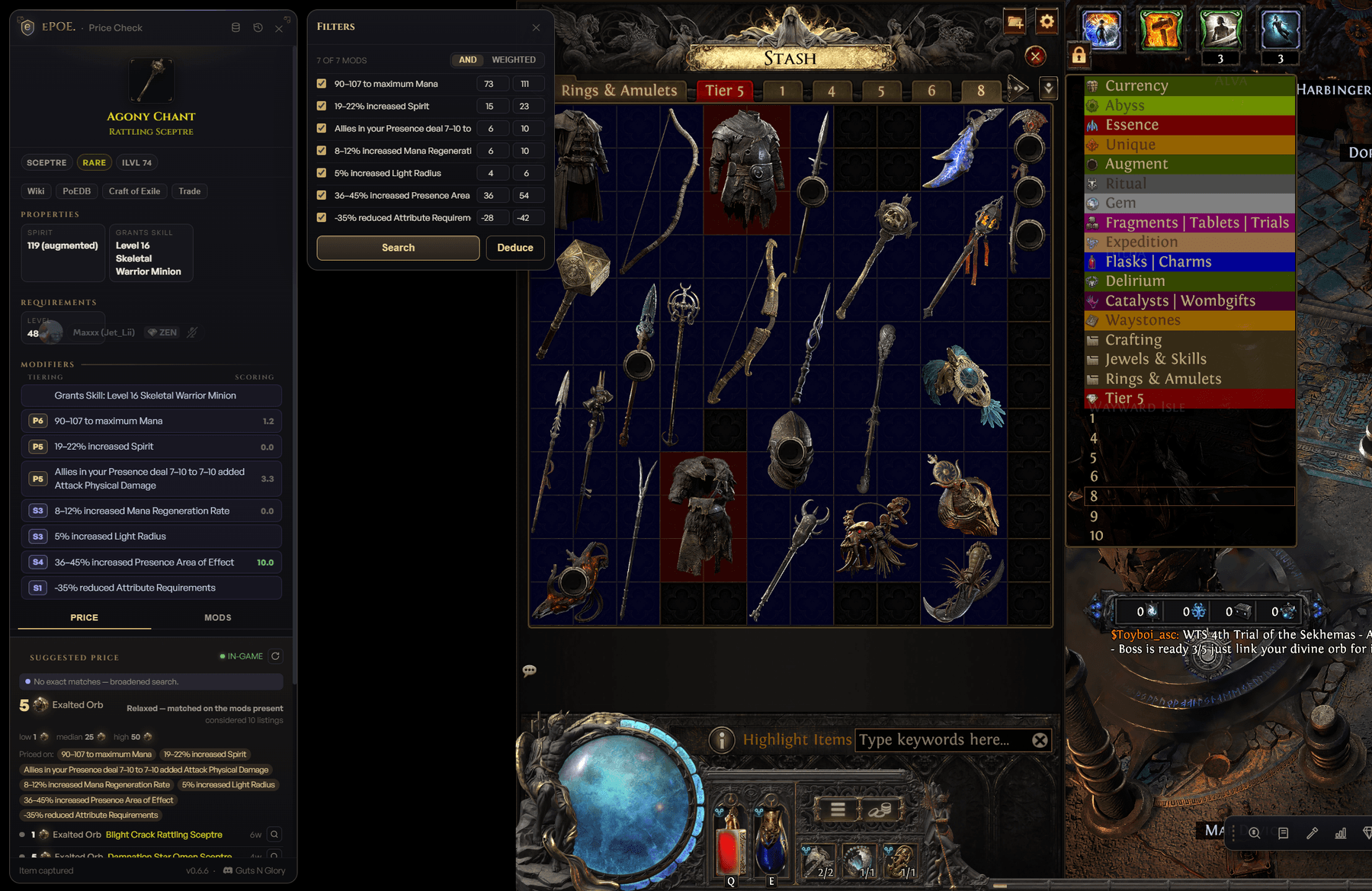
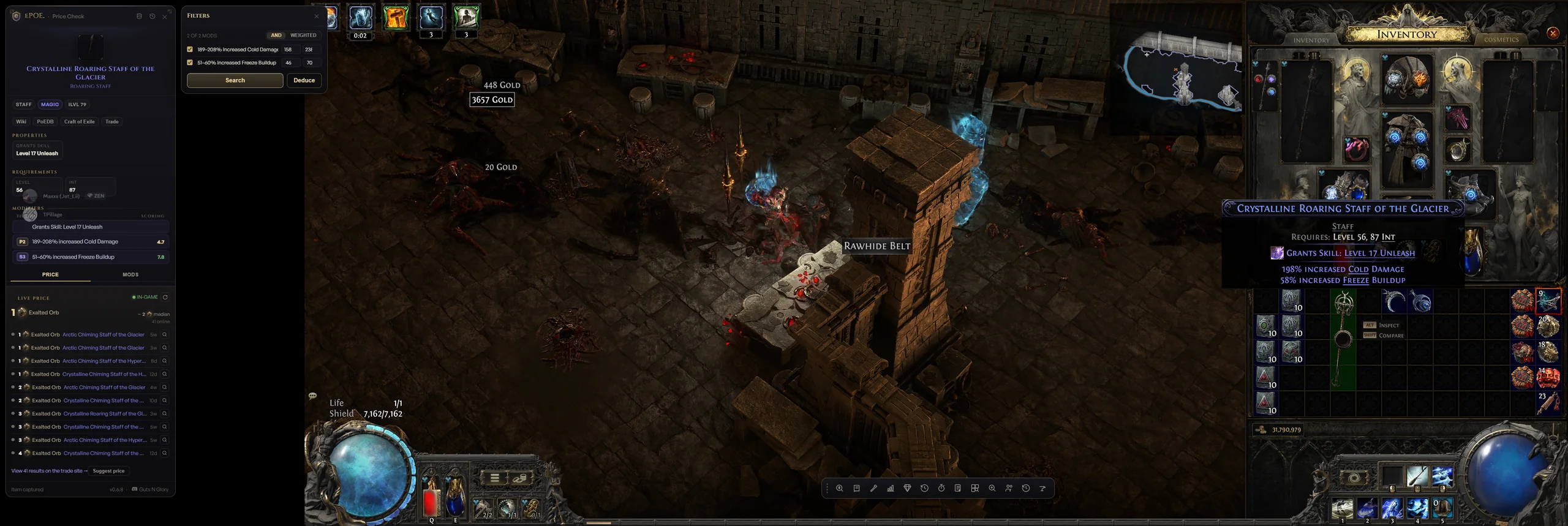
Ctrl+Alt+DHover an item, tap the key, get real comparable listings sampled across the whole market, a suggested price and a filter rail to narrow them.
Check an item’s price, plan a craft, or find your next upgrade. ePOE puts the tools over your game, with keyboard shortcuts you can change.
Actual screens from ePOE. Select any image to inspect it at full size; the shortcuts shown are the default bindings.
A price estimate is useful when you can see where it came from. ePOE shows comparable trade listings and lets you tighten or loosen the mod filters.
Use the roll-range sliders and mod-count filters to refine a search. Inspect the results and buy out an available listing from the panel.
From campaign routes to crafting and gear searches. Open the tools you use from the dashboard, or give them a shortcut in settings.
Hover an item to compare its mods against trade listings. Adjust the filters and buy out a listing from the panel.
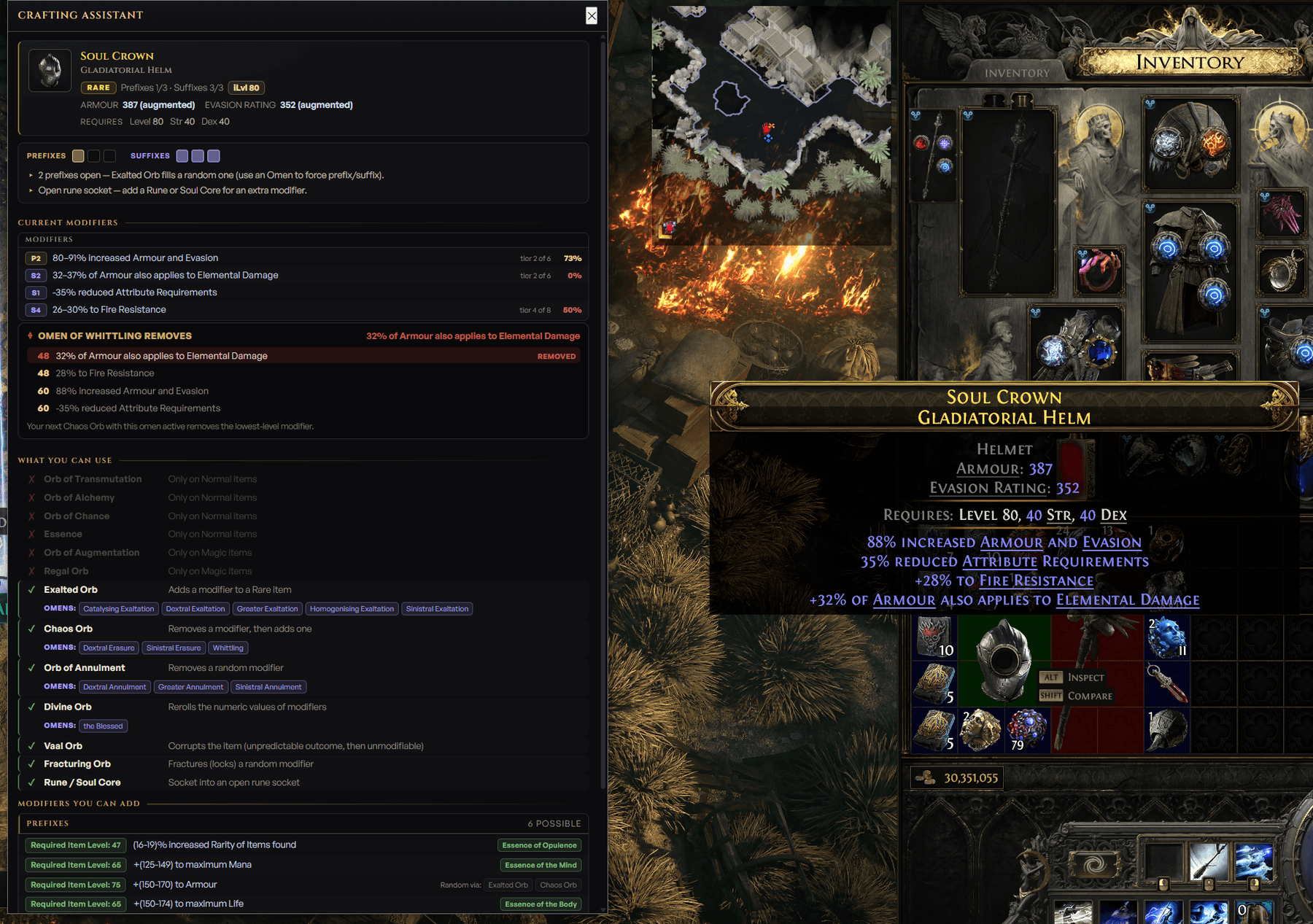
Ctrl+Alt+DLook up mod tiers and simulate a craft before spending your currency.
Ctrl+Alt+CTrack a stash slot to see its price badge and include it in your tab’s total value.
Ctrl+Alt+KFollow 333 campaign steps, with quest rewards and automatic zone progress.
Compare gear against your character and inspect the trade listings behind an upgrade.
Ctrl+Alt+UBrowse 1,834 item bases, uniques, and their requirements from the overlay.
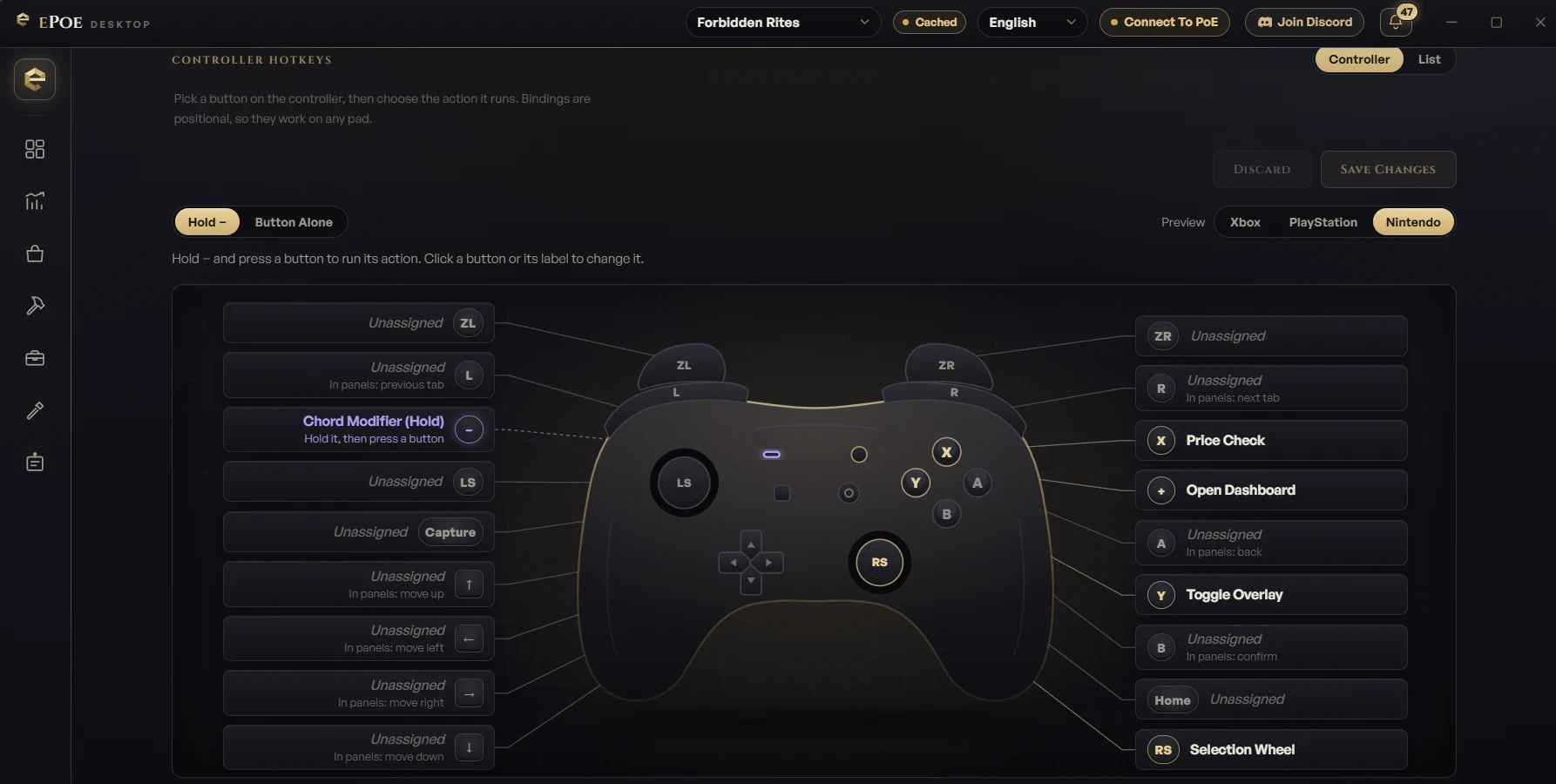
Assign controller chords to ePOE actions. Keyboard shortcuts stay available alongside them. Controller support is currently in beta.
View+YChoose the installer for your system. Once ePOE is running, set up the tools and bindings you want to use.
Import a build and inspect its passive tree. Use the upgrade finder to compare trade listings against your equipped gear.
Explore the full feature list, grouped by what you want to do.
Floats over the game, one hotkey away. It reads the item off your cursor via the game's own copy — no memory access, nothing GGG frowns on.
Hover an item, tap the key, get real comparable listings sampled across the whole market, a suggested price and a filter rail to narrow them.
A radial launcher that opens at your cursor with one spoke per enabled tool and the hotkey it answers to. Toggle it or hold it. A Favourites spoke lists your pinned tools and saved trade searches.
Live mod tiers and roll quality, every currency/essence you can still use, and what can still roll.
A 333-step act-by-act route in a movable window that advances itself as you change zones. Import a build and it turns build-aware, listing the skill gems to grab in each act and the milestones to hit. Recommended level, an EXP verdict, suggested farming zones, progress bars, a rewards-only filter, Complete Step and Undo Step keys and a compact mode. Open it from the feature bar, or bind it a key of your own.
Every base and unique, searchable in a popout over the game. Open it from the feature bar, or bind it a key of your own.
A slim launcher parked over your XP bar with one-click access to every tool. Run it, the Selection Wheel, or both.
Paints a price badge on the stash cell under your cursor, and only while that tab is open. The grid is found on screen at any resolution or UI scale, quad tabs included, and special tabs like currency and essences use their own slot layouts (beta). A badge hides once its item has moved or sold; two-click calibration is there if you ever need it.
A draggable pill with this tab's tracked value, every tab's, and your last Stash Valuation total.
Hover a currency in your stash for its Divine, Exalted and Chaos value, 24-hour and 7-day change, volume and a sparkline.
Hover a gear piece and the price panel opens an Upgrade tab that hunts for something better in that slot.
Paste a saved search string straight into the game's stash or vendor search with a key you bind to each slot. Anything past 250 characters pastes in chunks, and 6 bundled preset packs fill the slots for you.
Types the base type of the item under your cursor into the open stash or vendor search box.
A floating timer and a sticky notepad that remembers what you wrote. Both open from the feature bar, or from keys you bind.
Reopen recent price checks, look up items, and see your characters — all in-panel, from the feature bar or keys you bind.
Every listing GGG marks securable gets a Buy now button. It takes you to the seller's hideout and buys the item out of their stash, even when they are away.
One-click invite, trade, thank, kick, hideout, leave and exit for your last whisperer.
Every shortcut has a row, sorted by feature and searchable. Edits stage until you save, and two actions sharing a key are flagged first. Bind the mouse side buttons as well as the keyboard.
Choose the modifier and what scrolling up or down does while the game is active: a left click, the next or previous stash tab, or nothing.
On Windows, a Mouse 3, 4 or 5 press bound to an ePOE hotkey can be kept from also reaching the game. Off by default. Left and right clicks and other apps are never touched, and if it can't start, clicks simply go through.
Bind any action to a controller chord on Xbox, PlayStation or Nintendo pads, assign buttons on a controller diagram, and move through ePOE panels with the D-pad. Price-check cursorless off what your character stands on, steer the Selection Wheel with the right stick, and feel a rumble cue when a check lands. Keyboard and mouse keep working alongside.
While an ePOE panel is open the game stops receiving your controller, so browsing never moves your character. The rest of the time your input passes through untouched. Windows and Linux.
Bind a key to open the hovered item on the PoE2 Wiki, PoE2DB or Craft of Exile — or reopen your last trade search. Item links in the price panel go to the PoE2 sites too.
Pick which display the overlay uses when it isn't pinned to the game.
Hide every ePOE window from OBS and ShadowPlay capture while you still see it on screen.
Every trade lookup runs from your own connection, so you dodge the shared-server rate limits — add your session for even higher ones.
A deduction engine builds mod filters and relaxes them until real comparables come back, then prices from listings spread across the result — two per seller, never your own — capped at the cheapest listing at least as good as yours.
One slider sets how close a comparable's rolls must be; Advanced mode adds one per mod. Defences and damage start at 90% of your roll, life, resistances, speed and crit at 95%, sockets and levels exact.
Optionally require the item's number of prefixes, suffixes, crafted, desecrated, fractured or unrevealed mods, its resistance count, or total fire, cold and lightning resistance and movement speed.
Price-check currency, omens, essences, runes, fragments or gems and see the going rate for your league with its 24-hour and 7-day trend, a price chart and volume, above the live exchange offers.
The exchange leads with the typical offer, not the cheapest bait listing, and flags a rate far from the market as a thin market. Related currencies — other tiers of an essence, the rest of an omen family — are listed with their prices.
Corrupted, Twice-Corrupted, Fractured, Mirrored, Desecrated, Unrevealed, Identified, Crafted, Cultivated, Sanctified, Foreseeing, rarity, Quality, item level, rune sockets, exact base and affix counts, one click each.
Physical, elemental per element, chaos and total DPS with attacks per second and crit, plus DPS floors you can filter the results by.
Waystones are searched by their map properties, access items by base, and currency, omens and essences by exact name. Anything with a bulk market stays on the exchange.
Divine, Exalted, Chaos, Regal and Alchemy, converted through a direct exchange pair when one exists instead of chaining through Divine.
The aggregate market price and a 7-day trend for uniques and currency, right in the panel header.
Prices, 24-hour movers, volume and trend sparklines, plus price-history charts in Divine, Exalted and Chaos with drag-to-zoom and on-demand exchange depth.
Live currency-exchange rates from your own IP, plus a have→want calculator.
Enter a quantity and a spread, or an outright sell price, and see your outlay, return, profit, margin and break-even, prefilled from the live rate.
Search strings for gear, waystones and tablets, plus a Campaign mode that builds a vendor search from your act, slot, defence type and level window.
Import everything you have listed and price your whole shop in a single sweep, per league.
Browse a saved Stash Valuation snapshot as the real stash grid, zoom and pan it, with a value badge on every priced item.
Combined shop value, economy top movers, and your prices measured against the live market.
Your earnings over time, stored locally so the ledger grows past GGG's ~100-item cap.
An account-synced record of every price check you've run.
Set a target price on any item and get a desktop toast when it crosses.
Save, reopen, and reuse official trade searches without rebuilding the same filters.
Rank liquid movers with a scoring model that weighs strength against Divine, Exalted and Chaos, 7- and 30-day change, liquidity, stability and risk, with five sort presets.
Value selected private tabs when GGG permits access, track snapshots, and follow current or upcoming stash-tab sales. Your character's inventory can count too, a 5, 15 or 30-minute timer re-scans for you, and the total shows its change over the last day.
Powered by a bundled headless Path of Building — real DPS and EHP, computed on your PC. It doesn't just price upgrades now; it plans the whole build: gear, runes, gems and passive points. Install PoB and it just works.
Import one poe.ninja character and it drives the whole Build hub — overview, skills, items, passives, upgrades and leveling — refreshed on demand.
Finds gear that makes your build stronger. It's resistance-aware and knows what other items already cover, so it only asks each slot for what you actually need.
Hover any gear piece and the Upgrade tab runs the Upgrade Finder engine on it: a slot query built from your real gear and resistances, instant-buyout listings, and real ΔDPS and ΔEHP from headless Path of Building, sorted by gain.
No build loaded? Quick Upgrade falls back to a weighted better-overall search with ten archetype profiles. Auto reads your PoB build, weapons and off-hands always use it, and you can import or export your own.
Real ΔDPS and ΔEHP for every listing, computed by Path of Building — not a guess.
Ranks upgrades by the biggest real gain per Exalt spent.
Flags uncapped resistances, thin overcap, mana problems and missing recovery.
Copy any item in-game and see the exact swap scored against your build — upgrade or not.
Write an upgrade straight into your PoB build and save it, with a backup kept.
Scores every rune and soul core that fits a freed socket by the real DPS or EHP it adds, then ranks them.
Tests every node on your tree's frontier and ranks the ones that add the most DPS or EHP right now.
Drops each available support gem into your skill and ranks them by the real DPS they add.
Pick a stat and watch the gain-per-step fall off — so you stop pouring points into an already-capped wall.
Choose which skill to score, so every DPS number reflects the one you actually play — not whatever the build saved as main.
Import a PoB code, a Mobalytics or Maxroll link, a share link from GGG's own planner, or a .build file. Skills, gear, tree and a live stat sheet.
The real tree with GGG's own node art, drag-to-pan, scroll-zoom, your path lit gold.
Builds live on your ePOE account and follow you between machines.
Deterministic game data stays authoritative; bounded local OCR and vision assist only where the game exposes information visually. The scanners run on Windows and Linux alike, through a bundled Tesseract engine as well as Windows OCR.
Import an item, or bind Simulate Hovered Item and send it straight from the game. Spend Transmutation through Chaos on it, Greater and Perfect variants at their real minimum modifier level, Vaal Orbs, quality currency, 82 essences, 15 omens, Desecration bones, catalysts, runes and soul cores. It follows the real prefix and suffix caps, one Desecrated mod per item and item-level tier gating, and shows live defences, damage and DPS as you craft. Undo, seeded replays and a cost breakdown included.
All 1,834 bases and every unique, with each base's full craftable prefix/suffix pool by tier and ilvl.
Every skill and support gem with stats, tags, quality and the full level-progression table.
Essences, runes & soul cores, omens and distilled emotions — what each does, per slot.
Three-emotion passive recipes, live costs, inventory quantities, affordability, and three-to-one Reforging Bench planning.
A desktop page that reads the well's real choice rows with bounded local OCR — three passes per row, Windows OCR or a bundled Tesseract engine on Linux — reconciles them against deterministic RePoE pools, and paints a tier badge on each row over your game.
One scan finds the reward board at any resolution, ultrawide and 4:3 included, separates each reward by its frame, names it by its artwork (with a dedicated Omen matcher), prices it and highlights it in game: gold at a Divine or more, blue otherwise. Uniques with no market price are still recognised. It also reads your Tribute and advises take, reroll or bank for the Audience. Forbidden Rites now lives here.
Finds the reward panel on screen, reads each row separately at higher resolution, fixes common misreads, never prices placeholders like “Unique Helmet”, and marks the single best choice. Windows and Linux.
All 23 PoE2 ascendancies, spun Classic or Elimination. Pick your candidates, then jump to poe.ninja builds for the winner.
Pick a class, set opacity and a zoom anywhere from 1 % to 500 %, freeze the heatmap as a click-through layer over the game, and keep named snapshots.
39 offline guides written for ePOE plus evergreen PoE2 subjects, your own .md guides, a Links hub, and a Help centre that shows the hotkey you actually bound.
Pin the tools you use most, switch the dashboard between Artwork, Compact and List, and keep the full Tool Library at the bottom.
No ads, no cross-site trackers, no premium tier. Optional coarse product telemetry is transparent and can be disabled in the app.
English, Deutsch, Français, Español, Português, Polski, Türkçe, Русский, 한국어, 日本語, ไทย, 繁體中文 and 简体中文 — switchable live.
Already signed in on epoe.io? One click signs the app in. Email & password and Discord work too.
Your hotkeys, controller bindings, regex slots and profiles sync across every machine you sign in on — on by default, and yours to switch off.
Trade whispers, price alerts, shop sales and undercuts as native OS toasts, plus a notification bell in the app's title bar.
A self-hosted updater keeps you current — one click to restart and install.
A code-signed Windows installer, VirusTotal-clean, with a Linux AppImage too.
Trade searches run from your machine, most features work offline, and telemetry is opt-out. Error reports strip your username and anything that looks like a token before they leave, and switch off with telemetry.
Yes. The companion is free to use, with no ads or subscription.
ePOE reads the item text through the game’s item-copy feature and searches for comparable trade listings. It does not read game memory.
Windows and Linux installers are available on the download page. Check the setup guide for your platform.
Yes. Open the hotkey settings to change a binding. Conflicting bindings are flagged before saving. Tools without a default shortcut can be assigned one there.
Controller support is in beta. You can assign chords in the controller settings while keeping your keyboard hotkeys.
Free to use. No ads or subscription.