
Open your saved lists
Choose a Shopping list, Favorites, or Watchlist. Your overview is private; Share in channel posts a copy when you choose.

Donate today to unlock our new ePOE Discord bot with full white-label branding. Make it your own with your bot name, your logo, and your community, in one Discord server you own.
Price your drops, teleport and buy gear in game, plan your crafts, and find your next party—all from Discord.
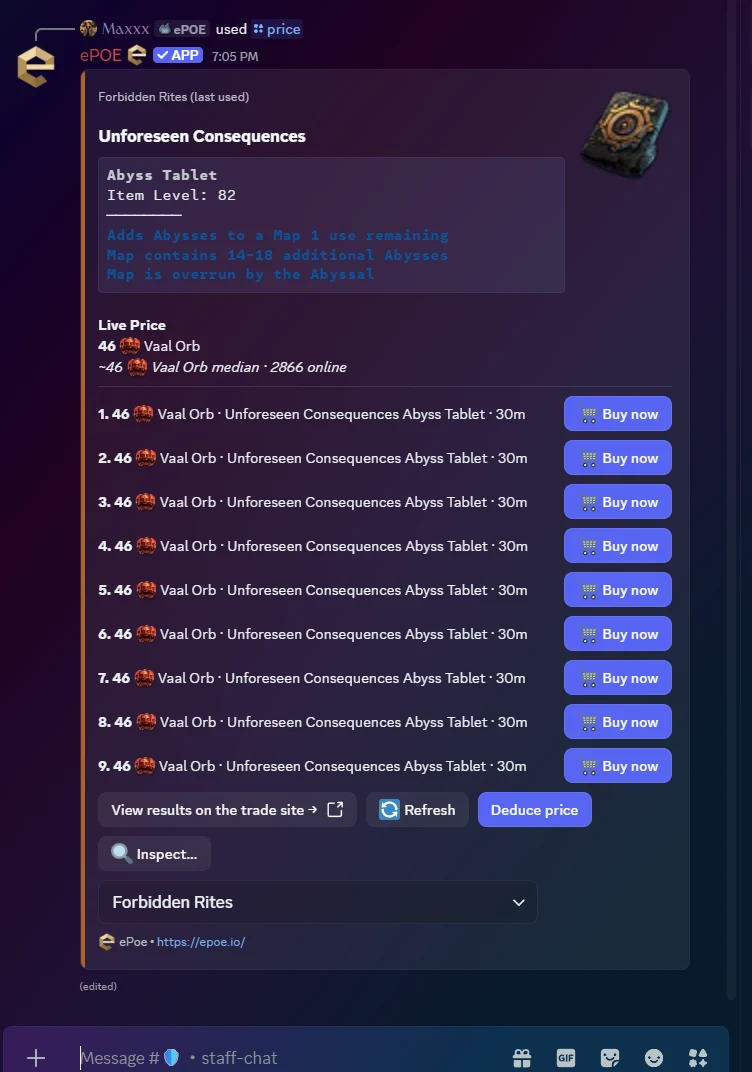
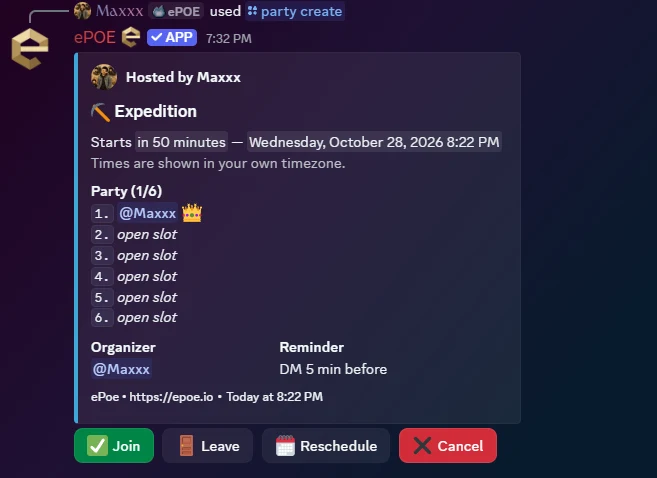
/price Check your drop./party create Find your group.
Buy Now lets you teleport to the seller’s hideout and purchase the item directly in game, just like Trade2.
Actual bot screenshots · October 28, 2026 · example prices.
From a drop to a decision
Copy an item in Path of Exile 2, run /price, and paste its text into the form. Your own running ePOE overlay checks the live listings and brings the result back to Discord.
/shopping · Your saved searches in Discord
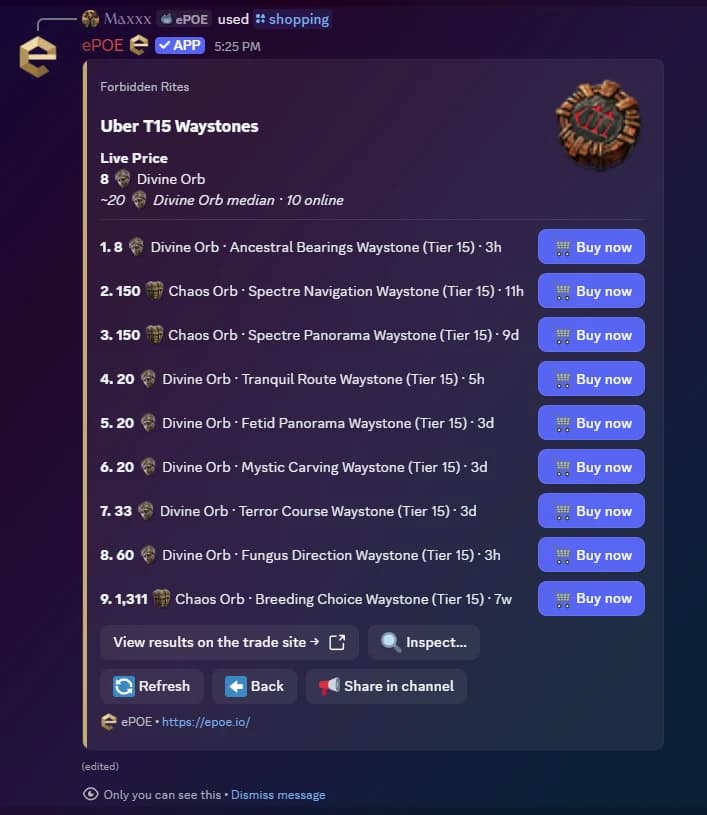
/shopping brings your saved ePOE Shopping lists, favorites, and watchlist into a private Discord reply. See market prices and watch targets, browse your items, then run a saved search through your overlay for live listings.
Page through your items, go back, refresh results, or inspect listings. Buy Now lets you teleport to the seller’s hideout and purchase the item directly in game, just like Trade2. Choose Share in channel to post a public copy; its controls still belong to you.
Link Discord to load your saved lists. Live searches and purchases need a running overlay with Shopping support (0.22.1 or later). Currency watches are exchange items and do not open item-listing searches.
Choose a Shopping list, Favorites, or Watchlist. Your overview is private; Share in channel posts a copy when you choose.
Open a saved list and select the item whose live listings you want to see.

With your overlay online, the saved search returns live listings. Inspect an item or refresh results, then use Buy Now on an eligible listing to teleport to the seller’s hideout and purchase the item directly in game, just like Trade2.
Keep an eye on the economy
Check exchange rates, compare the day’s movers, and track the items that matter to you without leaving Discord.
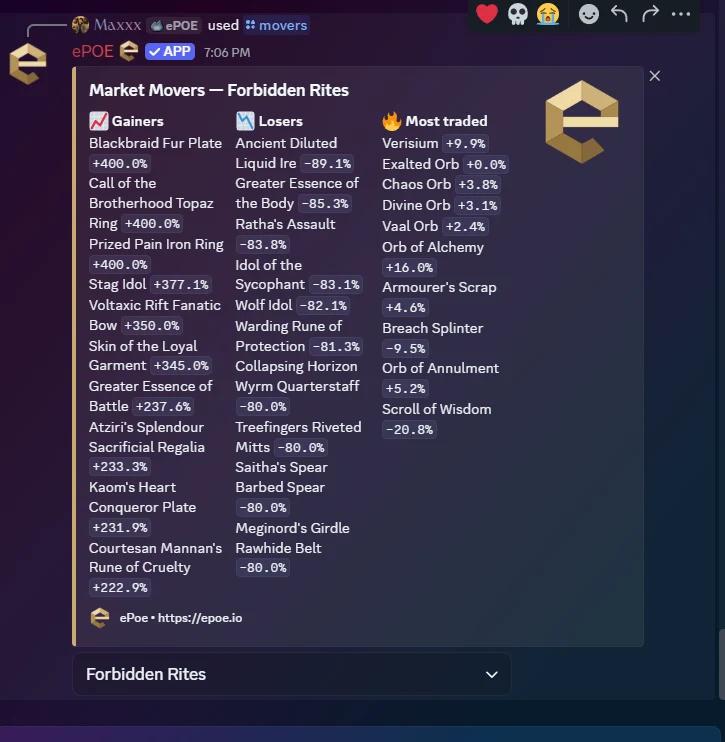
/marketSee how a Divine compares with Exalted and Chaos, together with the leading gainers and losers. Market commands support league selection.
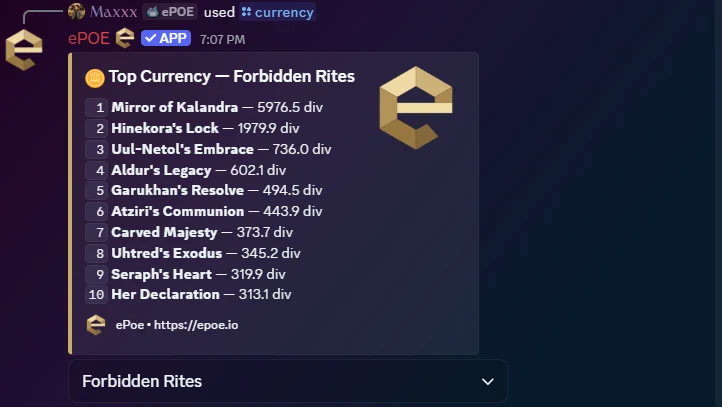
/uniques · /currencyBrowse the market’s valuable uniques and currency items, with prices to help put a drop in context.
Use /watch for a currency or unique, set a target in Divine, Exalted, or Chaos, and choose below for buying or above for selling. The bot checks periodically and sends a DM when the condition is met.
/watches lists active alerts; /unwatch removes one. Discord alerts are separate from your account’s Shopping watchlist. Allow DMs to receive notifications.
/uniques puts valuable unique drops and their market prices in one list.
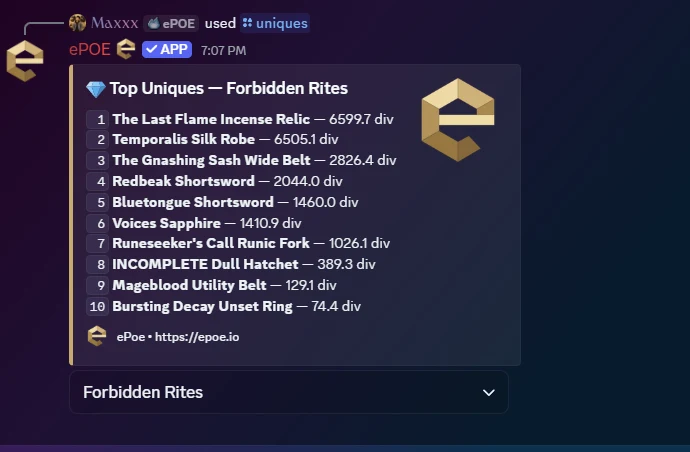
/currency gives currency items the same quick market overview.
Less tab switching. More planning.
Search by name or by what an item does. These captures show the path from choosing a command to opening the details.
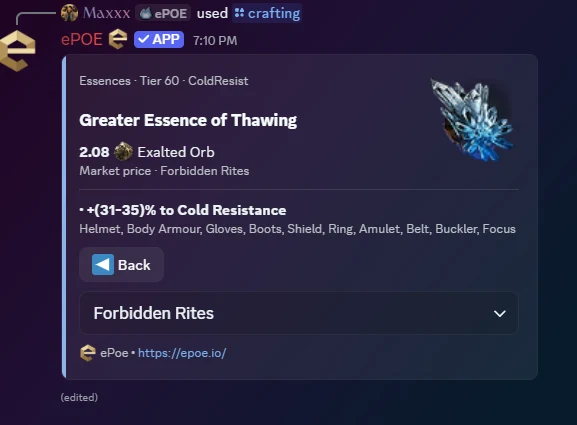
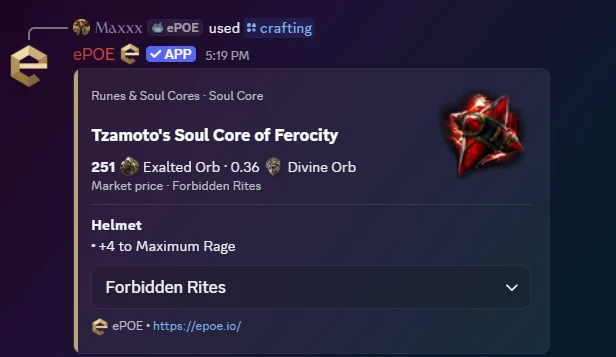
/craftingBrowse Essences, Runes & Soul Cores, Distilled Emotions, and Omens. Look up an item by name, or search for an effect such as cold resistance.
Pick a named item, search effect text, browse a category, or change the league used for prices.
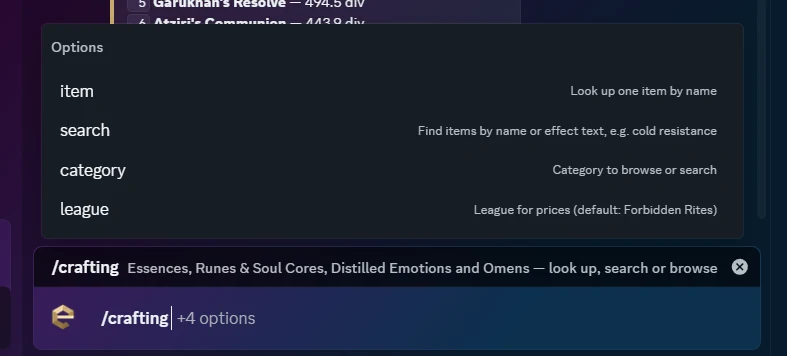
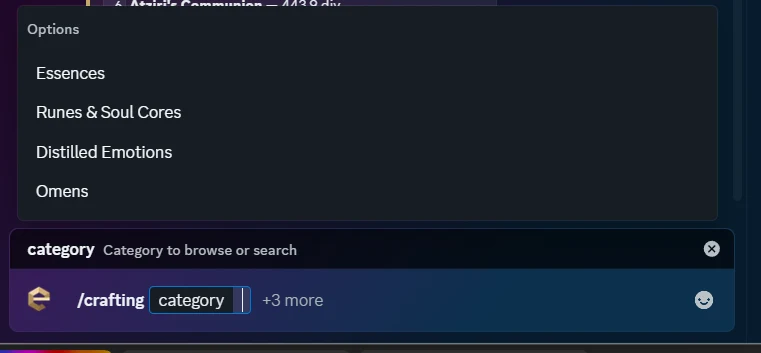
Narrow the lookup to Essences, Runes & Soul Cores, Distilled Emotions, or Omens.
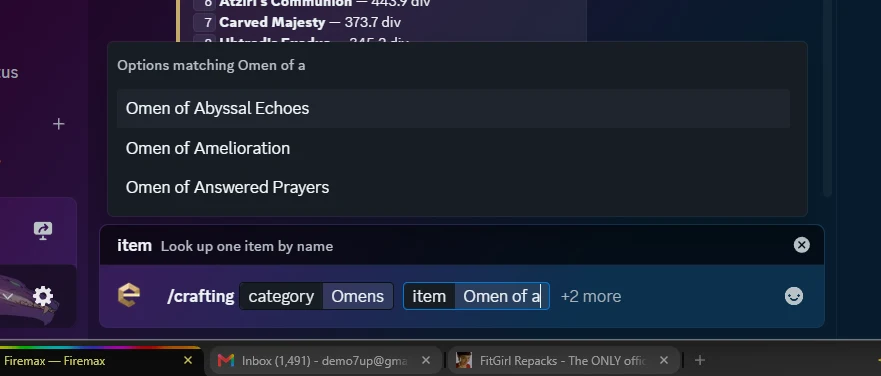
Autocomplete offers matching item names. This example narrows an Omen lookup before opening a result.
See the crafting effect, the equipment it applies to, and the available market price.
The Party feature
Turn “anyone up for maps?” into a scheduled run. Post a signup card, fill the slots, and give everyone a start time in their own timezone.
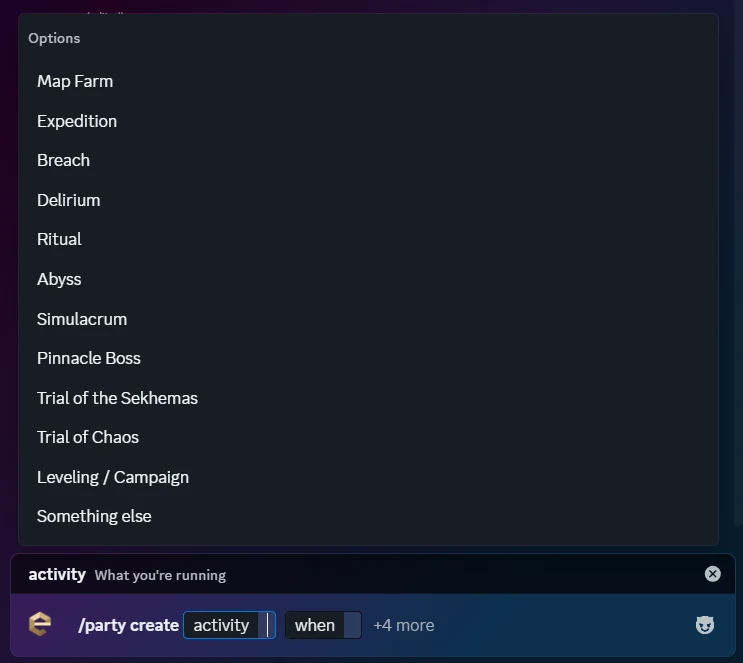
/party createChoose an activity and a start time, set a total party size from two to six (including you), and add an optional title and notes for the league, requirements, or voice channel.
Enter a relative time such as in 30m, or a local time such as tomorrow 8pm. Use the server’s timezone or choose one explicitly. Discord displays the scheduled time in each viewer’s local timezone.
Use /party list to browse this server’s upcoming runs and jump straight to their signup cards.
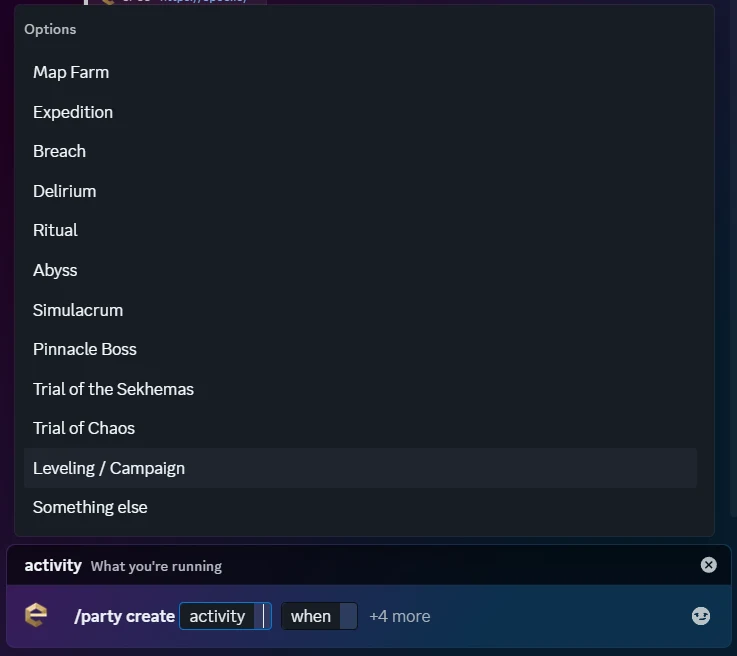
Use the activity option in /party create to choose maps, league mechanics, trials, bosses, or a custom run.
Keep this within reach
Every ePOE tool covered in one place. Expand a command for a quick explanation. Available commands and controls can vary with the server’s configuration.
/pricePaste an item copied from the game. Check live listings through your overlay, refresh, switch league, deduce a price, inspect results, and use Buy Now on eligible listings to teleport to the seller’s hideout and purchase the item directly in game, just like Trade2.
/shoppingOpen your linked ePOE Shopping lists, favorites, and watchlist. Browse saved items, run their searches, and use Buy Now on eligible listings to teleport to the seller’s hideout and purchase directly in game, just like Trade2. Share a private result in the channel when you choose.
/marketSee Divine exchange rates in Exalted and Chaos, alongside the day’s leading market movers.
/moversCompare gainers, losers, and the most traded items. Choose a league to put the numbers in context.
/uniquesBrowse a ranking of valuable unique items with their market prices.
/currencyBrowse a ranking of valuable currency items with their market prices.
/craftingLook up, search, or browse Essences, Runes & Soul Cores, Distilled Emotions, and Omens by name or effect text.
/itemsBrowse bases and uniques, inspect item details, and explore supported bases' modifier pools, prefixes, suffixes, and tiers.
/gemsFind skill, support, and meta gems by name or effect text, then open their reference details.
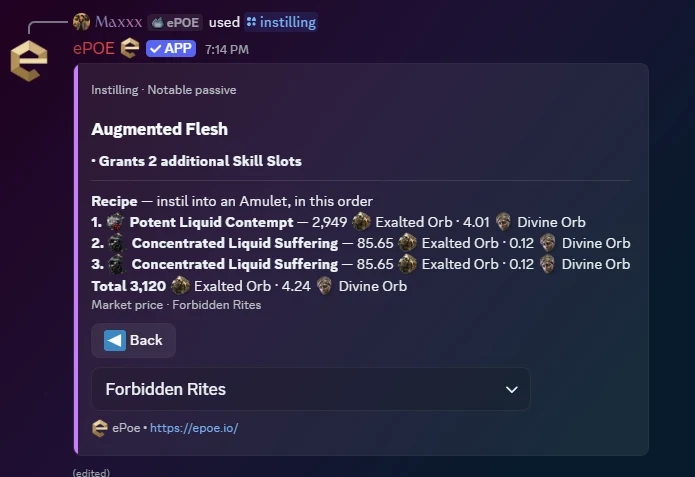
/instillingFind a notable’s three-emotion recipe, search by effect, filter by emotion, and compare recipe costs for a selected league.
/watchCreate a Discord price alert for a currency or unique. Set a target in Divine, Exalted, or Chaos and choose at-or-below or at-or-above.
Meet us in the server
Every donor keeps their badge, Discord community access, recognition, and alpha and beta access. Choose a period for white-label bot usage and priority support, or one $199 payment for lifetime access to both. Choose your contribution and supporter period on the donation page.
See donor perks and periodsSign in to epoe.io and link Discord in Settings, using the same Discord account you use on Firebot. This connects the bot to your own saved Shopping lists and enables live price-check jobs for your account.
Open account settingsDonors: add Firebot to a Discord server you own, then open the Firebot dashboard with the same Discord account and choose that server. The ePOE commands then work there. It must be a server you own (Manage Server isn’t enough), and you can move your perk to another server once every 7 days.
Add Firebot to your serverKeep ePOE signed in and running for live item checks and saved-search listings. With Path of Exile 2 open, Buy Now lets you teleport to the seller’s hideout and purchase the item directly in game, just like Trade2. Market references, Discord alerts, and Party scheduling do not need the overlay running.
Get the ePOE overlayYour badge, Discord role and supporter-only channels, optional recognition, and alpha and beta access are permanent. Only branded Discord bot usage and priority support follow your selected access period. A one-time $199 Lifetime contribution makes those two benefits permanent as well. See the donation page for amounts and periods.
Every donor level includes full white-label branding for your own Discord community: use your own bot name and logo. Replies show a small “Powered by ePOE” line by default, which you can switch off. The perk covers one Discord server you own (Manage Server isn’t enough) and can move to another server once every 7 days. Visit the donation page for timed or Lifetime bot access, and contact us through the ticket system or Discord for setup support.
When enabled by the server team, the Daily Market Digest posts exchange rates and the top gainers and losers to the configured channel. It covers current softcore leagues, so the community can catch up together.
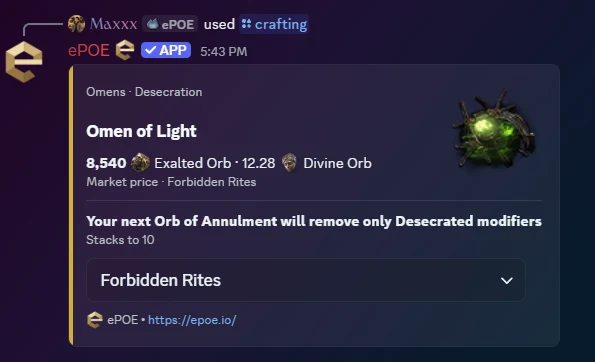
Open the matching Omen to read its effect and stack information alongside the league’s price.
Read the bonus for the equipment slot shown on the card before choosing a socketable.
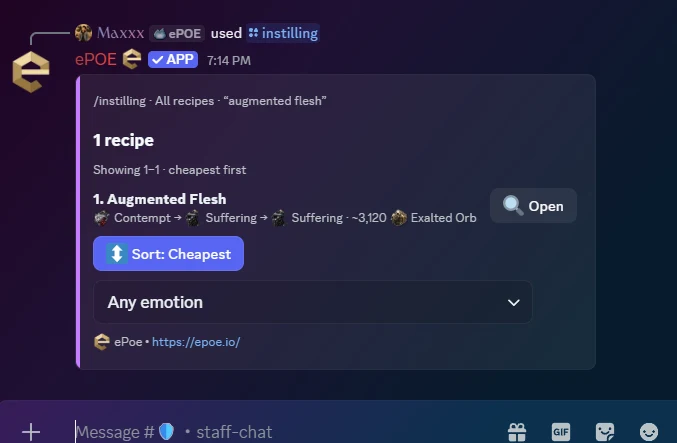
/instillingLook up a notable or search by effect, filter recipes by emotion, and compare costs in your selected league.
Search results show the matching notable, its emotion combination, and the estimated total. Use Open to see the full recipe.
The detail card shows what the notable grants, the three emotions in order, each ingredient’s price, and the total.
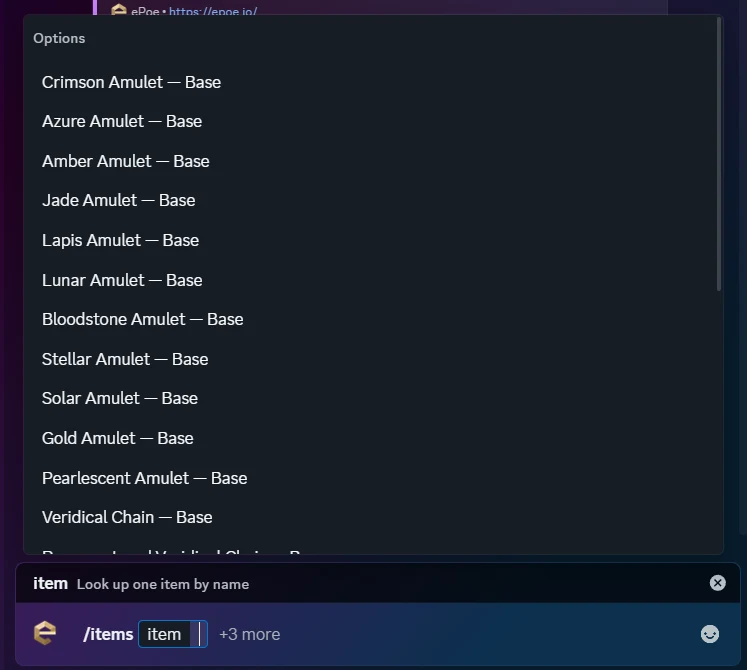
/itemsType into the item option to see matching bases and uniques. The amulet lookup here shows how autocomplete helps you choose a specific base.
Open a result to inspect its details. Supported bases also include a modifier browser for prefixes, suffixes, tier text, required item levels, and weights.
/gemsSearch skill, support, and meta gems. Open descriptions, tags, attribute requirements, quality effects, and level progression where the reference data provides them.
/buildPaste a raw Path of Building import code to show its main skill and the stats included in the import: Life, Energy Shield, Mana, and DPS when available. Import and edit the full build in ePOE.
Screenshots were captured on October 28 and November 1, 2026. Prices and listings are examples from those dates.
This second capture highlights Leveling / Campaign: the same Party tools also work for progressing together.
/watchesList your active Discord price alerts and their IDs.
/unwatchRemove an alert using its ID from /watches.
/buildPaste a raw Path of Building import code to preview its main skill and available Life, Energy Shield, Mana, and DPS values.
/party createSchedule a group with an activity, start time, two to six total slots, optional title and notes, and a timezone.
/party listSee upcoming parties in this server with start times, slot counts, organizers, and links to their signup cards.
/downloadGet the ePOE overlay download link for Windows and Linux.
/hotkeysFind the overlay's shortcut guidance. You can rebind shortcuts in the app's Settings.
/epoeGet a quick introduction and links to the website, download, and patch notes.
The real screenshots were captured on October 28 and November 1, 2026. Prices, rankings, leagues, and listing availability change; run a fresh command for the latest data.
Server settings control command availability, listing counts, reference categories, and individual price-check controls. The bot’s current command menu is the place to check what is available.
It previews values stored in a Path of Building import. Use ePOE and Path of Building for editing and simulation.