 ePOE feature guide3 min read
Dashboard home in ePOE: A Practical Guide
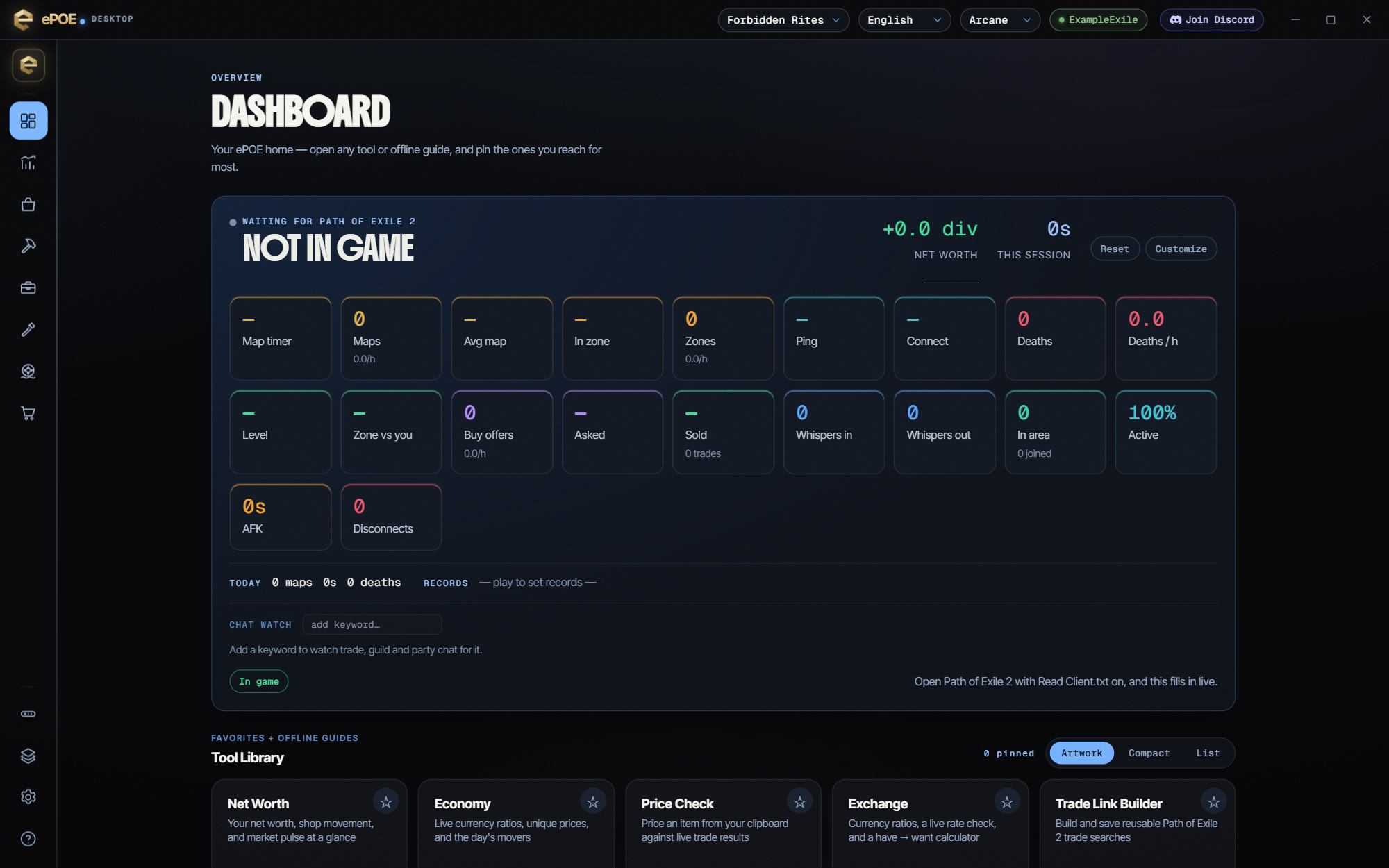
Your live Current Session panel plus the Tool Library — a card for every tool and offline guide, favorites first. (Net worth moved to Market → Net Worth.)


Your live Current Session panel plus the Tool Library — a card for every tool and offline guide, favorites first. (Net worth moved to Market → Net Worth.)
Where to start
Open Dashboard in ePOE Desktop. If your layout differs, use Help to search for Dashboard home.
If you prefer a keyboard shortcut, check this feature’s current binding under Overlays → Hotkeys. Bindings can be changed, so use the one shown in your app.
- Press the hotkey from anywhere — including from inside the game — to bring the app forward.
- Star any tool to pin it to Favorites; pinned tools sort to the front.
- Switch the tiles between Artwork, Compact and List with the control above them; the choice is remembered.
Tool Library
The Tool Library is a card for every feature ePOE has — Market, Shop, Build, Workbench, Scanners, guides and more — with a one-line description of each.
- Star any card to pin it to Favorites; pinned tools sort to the front.
- Switch the cards between Artwork, Compact and List with the control in the header; the choice is remembered.
- Click a card to open that tool, exactly as its rail icon would.
Current Session
The panel at the top reads Path of Exile 2's own log (`Client.txt`) and turns it into a live picture of what you're doing right now. It needs Settings → Price Checks → Behavior → Read Client.txt turned on — it is on by default, and ePOE finds the log automatically across supported Steam libraries and drives; a custom installation may still need a manual path. When the game isn't running it shows a "waiting for Path of Exile 2" state.
What it surfaces:
- Where you are — the area's real name and level, and a badge for the kind of area: Map, Hideout, Town or Atlas.
- Pace — a live map timer, maps per hour (hideouts don't count), average and fastest map, plus zones entered.
- Connection — connect latency and a live ping sparkline, your region, and disconnects.
- Combat & character — deaths and any cause information present in the log, your level and class, and how the area's level compares to yours.
- Trade & social — incoming buy offers and their asked value, an estimate of what you've sold, whispers in and out, and how many players are in your area.
- Net worth this session — the change in your shop's divine value since the session began, with a sparkline.
- Activity feed — the last few notable events (zone changes, level-ups, deaths, offers, trades).
- Today and Records — totals for today across sessions, and your personal bests (maps/hour, fastest map, most maps, longest session). These persist between launches.
Try it in your next session
Start with the first action in the walkthrough, check the values and state the app shows, then continue with the settings that suit your character or workflow. Your own configured hotkeys and selected league take priority over an example in a screenshot.
Download ePOE · Read the current changelog · Browse the guides