 ePOE feature guide3 min read
Crafting Assistant in ePOE: A Practical Guide
Copies the hovered item and shows roll quality, which currency can still do something, and what could still roll.


Copies the hovered item and shows roll quality, which currency can still do something, and what could still roll.
Live mod tiers and roll quality, every currency/essence you can still use, and what can still roll.
Where to start
The feature-bar button opens the window without copying, so it doesn't load whatever you last price-checked.
If you prefer a keyboard shortcut, check this feature’s current binding under Overlays → Hotkeys. Bindings can be changed, so use the one shown in your app.
- Turn on Advanced Mod Descriptions in the game so tier data is copied with the item.
- Hover the item and press the hotkey.
- Check the slot diagram: which prefix and suffix slots are actually open?
- Read the usable-currency list and its reasons. Greyed-out actions are unavailable in the assistant’s model of the item.
- Open the Desecration section to see what a bone could add to this base: every Well of Souls modifier grouped by prefix and suffix, with its tier, the bones whose slot and level window reach it (Collarbones for a ring, Ribs for armour, Jawbones for a weapon), and the omen that guarantees its family. Modifiers whose group the item already carries are struck through, because they can never roll. It stays collapsed until you open it and says why the item cannot be desecrated when it cannot.
- Price the item first. If the craft costs more than a finished one sells for, buy instead.
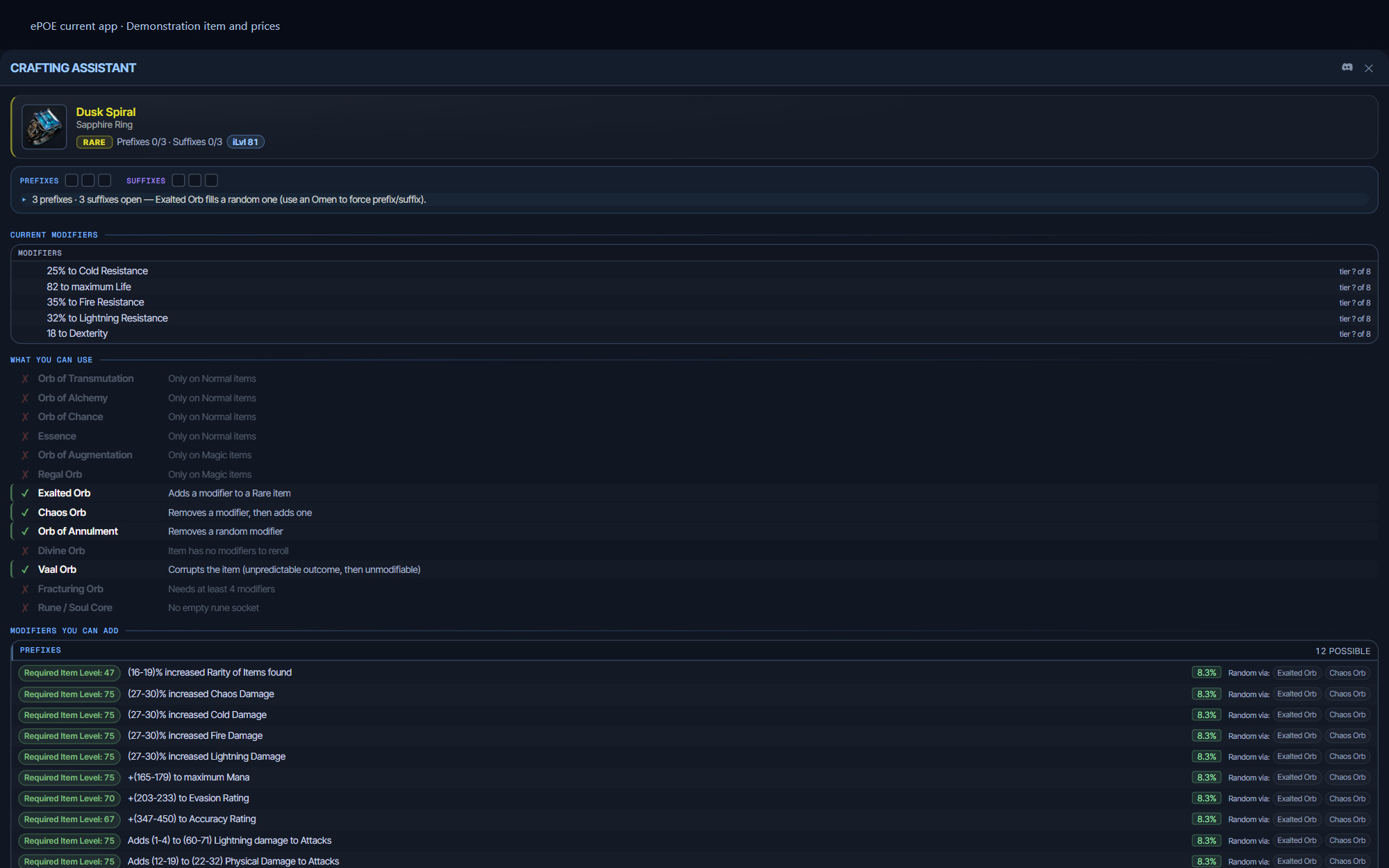
What it shows
Roll quality per modifier. For each mod: its tier, and where inside that tier's range it landed. A Divine Orb can reroll numeric values within existing modifier ranges; it does not raise a modifier to another tier and can produce a worse roll. Requires Advanced Mod Descriptions to be on in the game's UI options — without it the game does not include tier data in the copied text.
Usable currency. Not a list of every orb; a list of the orbs that would actually do something to this item in this state. An Exalted Orb needs an empty affix slot. A Regal needs a magic item. A Divine needs a mod with a range left to improve. The assistant checks the item's state and greys out the rest, which stops the most common crafting mistake — firing an orb that cannot apply.
Rollable modifiers. Every mod the base could still roll, filtered to the item's level and the pool that has room. This is the "what am I hoping for" list, and it is the honest one: if the mod you want needs ilvl 82 and your base is ilvl 74, it will not appear.
Omens. Which omens change the next craft usefully, and what they would do. Omens are single-use and frequently worth more than the craft — the assistant is there so you check before you burn one.
The feature in practice
Hover an item and press Ctrl+Alt+C. The Crafting Assistant copies it and opens a window that answers the question you actually have: what can I still do to this, and is it worth doing?
Try it in your next session
Start with the first action in the walkthrough, check the values and state the app shows, then continue with the settings that suit your character or workflow. Your own configured hotkeys and selected league take priority over an example in a screenshot.
Download ePOE · Read the current changelog · Browse the guides


