 ePOE feature guide3 min read
Simulate Hovered Item in ePOE: A Practical Guide
Copies the item under your cursor in Path of Exile 2 and loads it straight into the Crafting Simulator in the desktop app, so you can try a craft on the exact item you are holding.


Copies the item under your cursor in Path of Exile 2 and loads it straight into the Crafting Simulator in the desktop app, so you can try a craft on the exact item you are holding.
Where to start
Unbound by default — give it a key under Overlays → Hotkeys → Tool windows → Simulate Hovered Item.
If you prefer a keyboard shortcut, check this feature’s current binding under Overlays → Hotkeys. Bindings can be changed, so use the one shown in your app.
- Open Overlays → Hotkeys, find Simulate Hovered Item under Tool windows, press the combination you want, then Save changes.
- In game, hover the item and press the key; the app comes forward on Workbench → Crafting Simulator with the item loaded.
- Turn on Advanced Mod Descriptions in the game's options so tiers come across with the copy.
- Lines the simulator cannot place are listed under the import box rather than silently dropped.
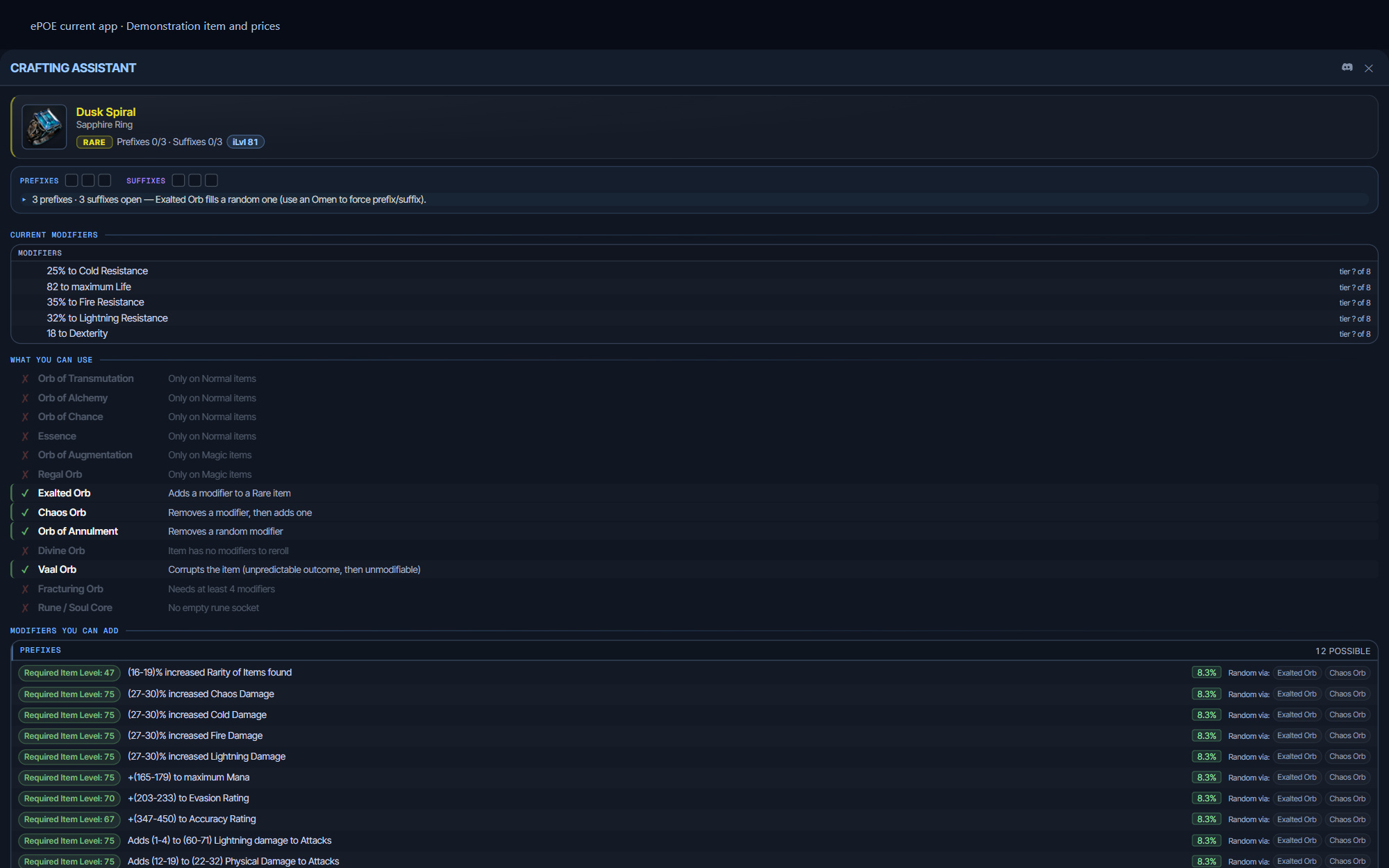
Simulate the item you are hovering
The quickest way in is the Simulate Hovered Item hotkey. Hover an item in Path of Exile 2, press it, and ePOE copies the item and opens the desktop app on the Crafting Simulator with that item already loaded.
It is unbound by default. To bind it, open Overlays → Hotkeys, find Simulate Hovered Item under Tool windows, press the combination you want and then Save changes. Turn on Advanced Mod Descriptions in the game's options first, so tiers come across with the copy.
The point is the question you cannot otherwise answer without paying for the answer: if I take this base and hit it with forty Exalted Orbs, what does it actually look like?
What it does not simulate
Real odds. This is the important one. The bundled modifier pool says which modifiers and tiers can roll on a base; it does not carry PoE2's real spawn weights. Inside the eligible set every tier here is equally likely, and in the game they are emphatically not — actual tier frequencies are not represented by the simulator’s equal-choice model. Treat an outcome here as a plausible result, never as a representative one, and never as odds. The Well of Souls page will at least put a number on a specific desecrated modifier and cost the attempts, but it reads the same weightless pool, so that number is a share of the eligible set rather than a measured chance.
Vaal Orb outcome weights, and the Orb of Chance rate. The Vaal Orb's outcomes match the game — it corrupts and then does nothing, grants a corrupted enchantment, or on an item that takes sockets opens one past the normal cap — but the real odds are not published, so the three are equally likely here. The enchantment itself is recorded as a note rather than invented as a modifier. The Orb of Chance either makes a unique or destroys the base, and nothing says how often, so it is only simulated when the outcome is certain — under an Omen of the Ancients — and refused with that reason otherwise.
Try it in your next session
Start with the first action in the walkthrough, check the values and state the app shows, then continue with the settings that suit your character or workflow. Your own configured hotkeys and selected league take priority over an example in a screenshot.
Download ePOE · Read the current changelog · Browse the guides


