 ePOE feature guide4 min read
Crafting Simulator: Try the Craft Before You Spend
Spend imaginary currency on a real item — caps, tiers, essences, bones, omens, catalysts, runes and soul cores, with live item stats, seeded so a run can be replayed exactly.


Spend imaginary currency on a real item — caps, tiers, essences, bones, omens, catalysts, runes and soul cores, with live item stats, seeded so a run can be replayed exactly.
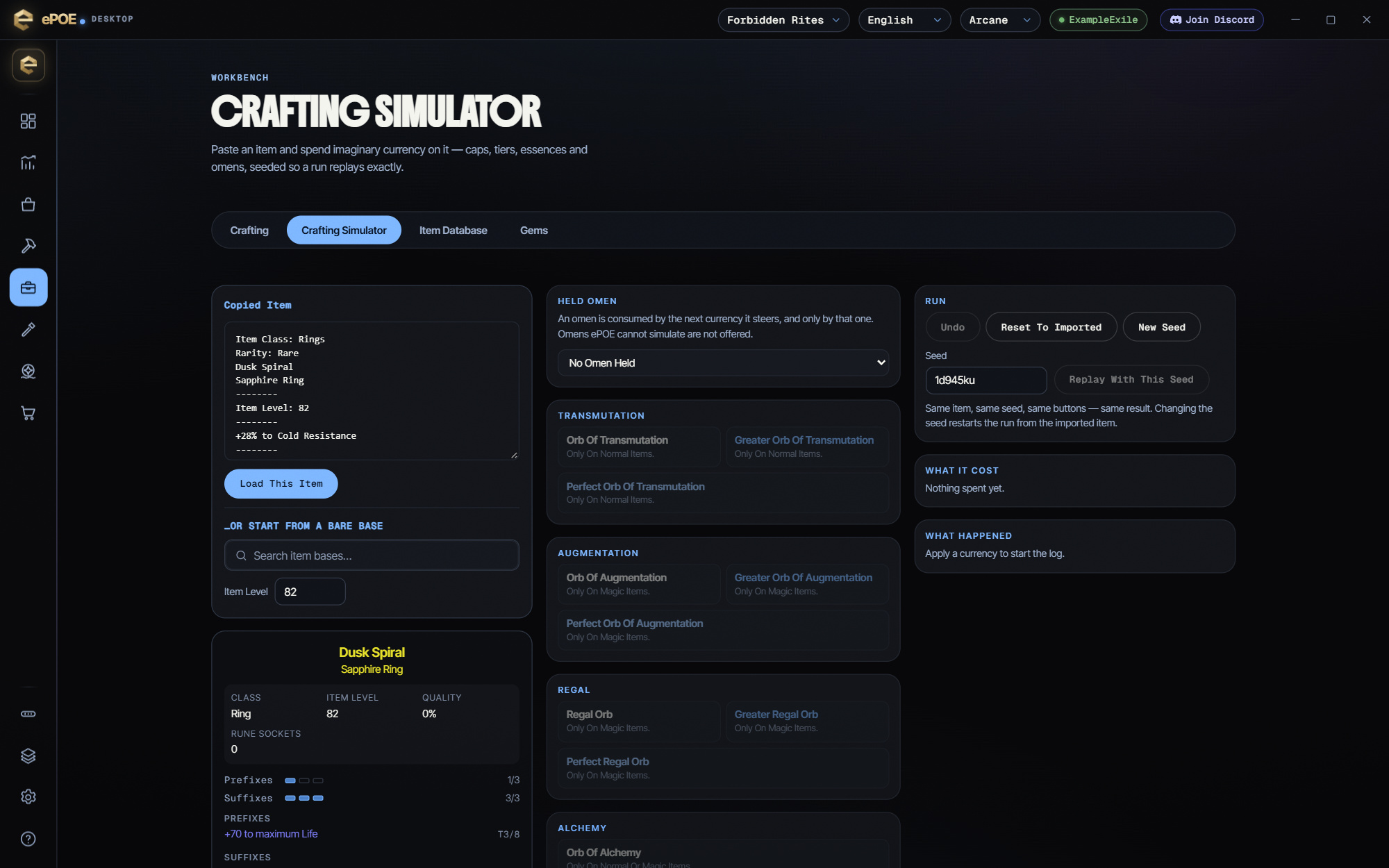
Import an item, or bind Simulate Hovered Item and send it straight from the game. Spend Transmutation through Chaos on it, Greater and Perfect variants at their real minimum modifier level, Vaal Orbs, quality currency, the bundled essences and omens, Desecration bones, catalysts, runes and soul cores. It follows the real prefix and suffix caps, one Desecrated mod per item and item-level tier gating, and shows live defences, damage and DPS as you craft. Undo, seeded replays and a cost breakdown included.
Where to start
Open Workbench → Crafting Simulator, bind a key to open it as a window over the game, or bind Simulate Hovered Item to load the item under your cursor.
If you prefer a keyboard shortcut, check this feature’s current binding under Overlays → Hotkeys. Bindings can be changed, so use the one shown in your app.
- Paste a copied item, search for a base and pick the item level you would buy, or hover the item in game and press Simulate Hovered Item.
- Apply currency from the palette — anything greyed out says why it cannot be used.
- Hold an omen first when you want to steer the next orb; it is consumed only by the currency it steers.
- Try the Desecration family on a Rare item: a bone adds one modifier from the base's Well of Souls pool, under the same slot caps and group rules as everything else. Only the bones that fit the slot are offered — Collarbones for jewellery, Ribs for armour, Jawbones for weapons and quivers, a Cranium for a jewel. The Necromancy omens steer which side it lands on, and the Liege, Sovereign and Blackblooded each guarantee one of the three modifier families on a weapon or a piece of jewellery. An item holds only one Desecrated modifier.
- Add Catalysts to a ring, amulet or jewel to raise one type of modifier, and put runes and soul cores into empty sockets from the Runes and soul cores list — each shows its effect for this item's slot.
- Watch the Item stats on the card — armour, evasion, energy shield, damage, attack speed, crit, block and DPS update as you craft.
- Undo, or reset to the imported item, as often as you like — the seed makes every run repeatable.
- Compare the cost panel with comparable asking prices for the finished item before you try it for real.
- Remember what it is not: the bundled pool has no spawn weights, so outcomes here are plausible, not representative.
Simulate the item you are hovering
The quickest way in is the Simulate Hovered Item hotkey. Hover an item in Path of Exile 2, press it, and ePOE copies the item and opens the desktop app on the Crafting Simulator with that item already loaded.
It is unbound by default. To bind it, open Overlays → Hotkeys, find Simulate Hovered Item under Tool windows, press the combination you want and then Save changes. Turn on Advanced Mod Descriptions in the game's options first, so tiers come across with the copy.
The point is the question you cannot otherwise answer without paying for the answer: if I take this base and hit it with forty Exalted Orbs, what does it actually look like?
The feature in practice
Open Workbench → Crafting Simulator, or bind a hotkey to open it as a window over the game. Paste a copied item — or pick a bare base and an item level — and start applying currency. Nothing you do here touches your stash, your account or anything else. It is a sandbox.
Try it in your next session
Start with the first action in the walkthrough, check the values and state the app shows, then continue with the settings that suit your character or workflow. Your own configured hotkeys and selected league take priority over an example in a screenshot.
Download ePOE · Read the current changelog · Browse the guides


