 ePOE feature guide3 min read
Exchange in ePOE: A Practical Guide
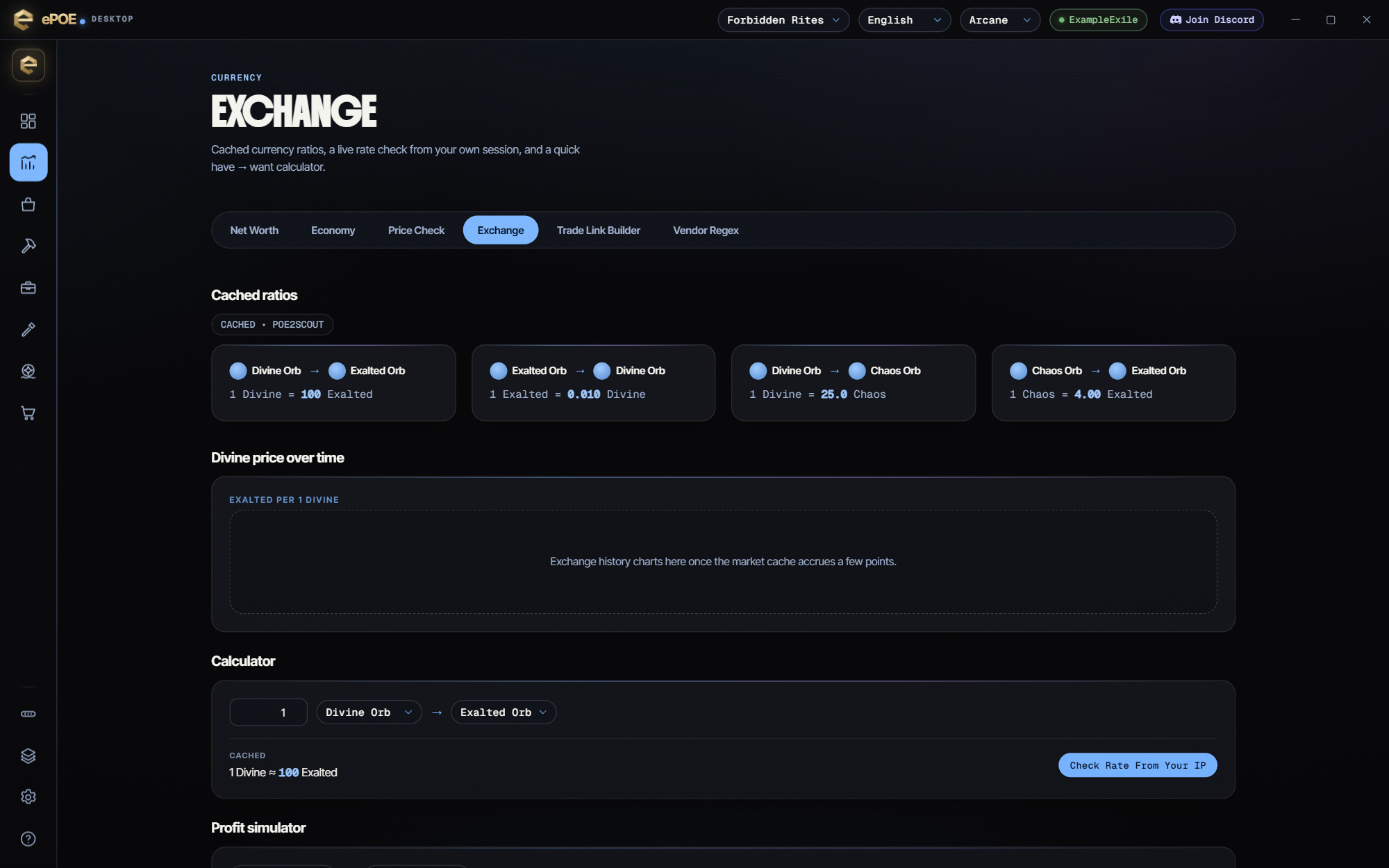
Cached Divine, Exalted and Chaos ratios, the Divine price over time, a have-to-want calculator with a live rate check from your own session, and a profit simulator.


Cached Divine, Exalted and Chaos ratios, the Divine price over time, a have-to-want calculator with a live rate check from your own session, and a profit simulator.
The exchange leads with the typical offer, not the cheapest bait listing, and flags a rate far from the market as a thin market. Related currencies — other tiers of an essence, the rest of an omen family — are listed with their prices.
Where to start
Open Market → Exchange in ePOE Desktop. If your layout differs, use Help to search for Exchange.
- Open Market → Exchange and read the cached ratios; the badge says whether they are Live or Cached from poe2scout, and how old they are.
- Read Divine price over time for how many Exalted Orbs one Divine Orb costs; it fills in as the market cache collects points.
- In the Calculator, set Have, Want and Amount for the cached conversion, then press Check rate from your IP for a live quote from your own session, with how many offers it found.
- In the Profit simulator, enter a Quantity and Buy price, then a Sell price or a Spread %, to see Invested, Revenue, Profit, Margin and Break-even sell. It assumes every unit sells at your price, so treat it as the best case.
- For stackables, always use the exchange rather than individual listings.
Practical habits
- Sell in bulk through the exchange, not as individual listings. One listing per orb is a waste of a stash tab and gets you worse rates.
- Price-check a stack, not a unit. The bulk rate for 100 is not 100× the rate for one.
- Keep one tab as a currency tab and let it stack. Currency scattered across a general tab is currency you will forget you own; private Stash Valuation is currently disabled, so inspect your storage directly.
- Don't hoard what you cannot use. A thousand Orbs of Chance is not a war chest, it is a vendor recipe you never ran.
The three that set prices
- Exalted Orb — adds a random modifier to a magic or rare item that has an empty affix slot. Because it is common and every crafter wants it, it is the everyday unit of account. Most items under a divine are priced in exalted.
- Divine Orb — rerolls the numeric values of an item's existing modifiers without changing which modifiers it has. It is the "perfect the item I already have" orb, which makes it the high-value currency. Expensive items are priced in divine.
- Chaos Orb — removes a random modifier and adds a new random one. Useful, volatile, and the third leg of the price triangle.
Whatever the rates are in your league, you should know the divine-to-exalted rate roughly by heart, because it is the conversion every negotiation implicitly uses. ePOE shows it live on the price panel and on the Exchange page.
Try it in your next session
Start with the first action in the walkthrough, check the values and state the app shows, then continue with the settings that suit your character or workflow. Your own configured hotkeys and selected league take priority over an example in a screenshot.
Download ePOE · Read the current changelog · Browse the guides


