 ePOE feature guide2 min read
Item reference & outside links in ePOE: A Practical Guide
Hotkeys that act on the hovered item without a normal price check: its reference card, a locked panel you can click, the last trade search, and the item on the PoE2 Wiki, PoEDB or Craft of Exile.


Hotkeys that act on the hovered item without a normal price check: its reference card, a locked panel you can click, the last trade search, and the item on the PoE2 Wiki, PoEDB or Craft of Exile.
Where to start
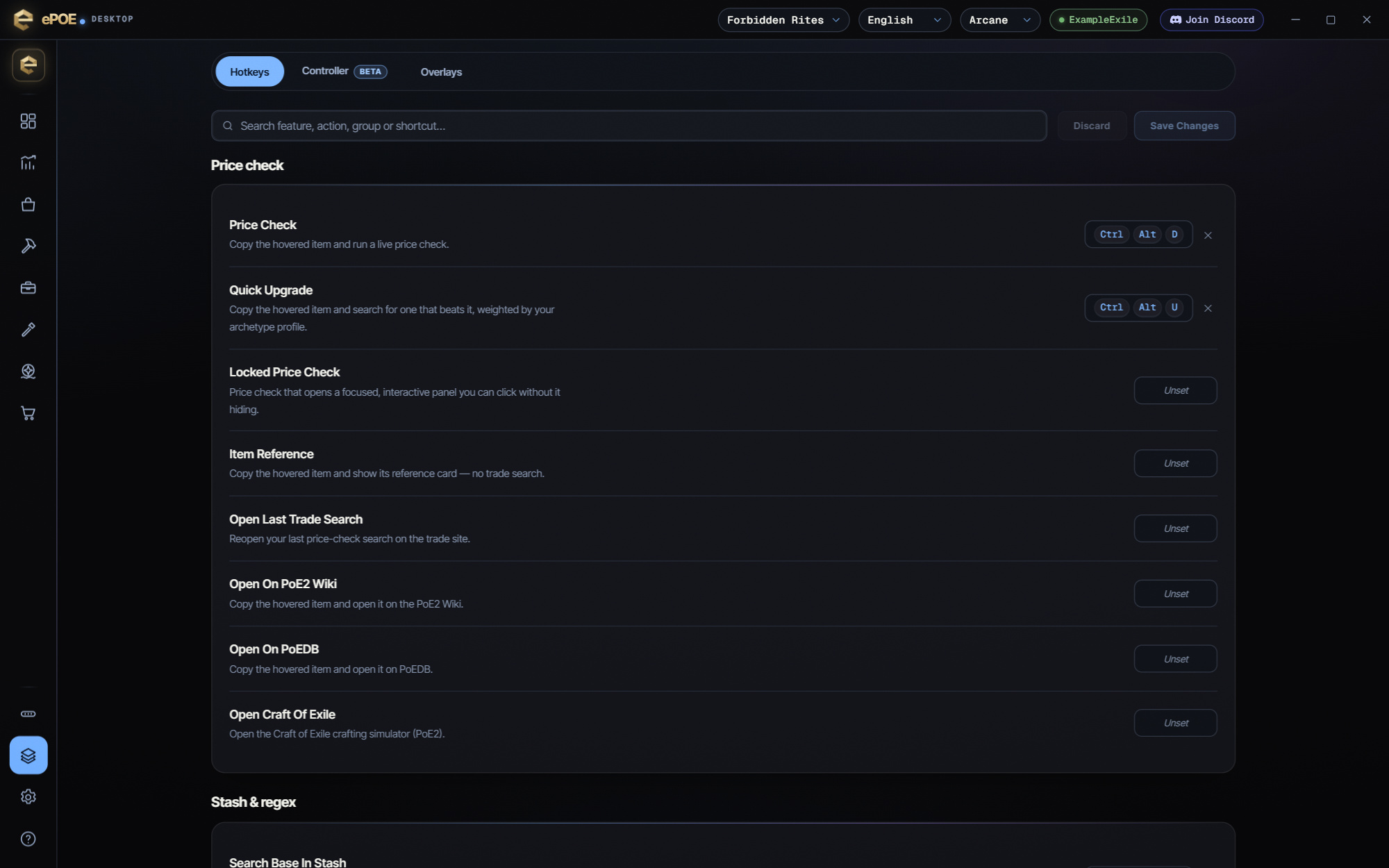
All of these are unbound by default — bind the ones you want under Overlays → Hotkeys → Price check.
If you prefer a keyboard shortcut, check this feature’s current binding under Overlays → Hotkeys. Bindings can be changed, so use the one shown in your app.
- Item Reference copies the hovered item and shows its reference card, without spending a trade search.
- Locked Price Check opens the normal valuation focused, so you can click and edit the panel without it hiding.
- Open Last Trade Search reopens your most recent price check on the trade site, to finish with its own filters.
- Open On PoE2 Wiki and Open On PoEDB copy the hovered item and open its page; Open Craft Of Exile opens the crafting simulator.
Price check variants
- Locked Price Check (unbound) — the same check, but the panel opens focused so you can click filters straight away without it hiding.
- Item Reference (unbound) — copies the item and shows its card with no trade search at all. Handy for reading a base or checking the Mods tab without using a search. Check price runs the search if you change your mind.
- Quick Upgrade (Ctrl+Alt+U) — searches for something better than the hovered item. See Quick Upgrade.
- Open Last Trade Search (unbound) — reopens your last price check's search on the trade site. Run a check first; with none it just tells you so.
Outside sites
- Open On PoE2 Wiki and Open On PoEDB (both unbound) copy the hovered item and open it on the Path of Exile 2 wiki or PoE2DB — by name for a unique, by base type for a rare. The item links on the price panel open the same PoE2 sites.
- Open Craft Of Exile (unbound) opens the Craft of Exile PoE2 simulator. It doesn't need an item.
Try it in your next session
Start with the first action in the walkthrough, check the values and state the app shows, then continue with the settings that suit your character or workflow. Your own configured hotkeys and selected league take priority over an example in a screenshot.
Download ePOE · Read the current changelog · Browse the guides


