 ePOE feature guide3 min read
Notifications in ePOE: A Practical Guide
Desktop toasts for trade whispers, price alerts, shop sales, undercuts, app updates and support replies, plus the title-bar bell.


Desktop toasts for trade whispers, price alerts, shop sales, undercuts, app updates and support replies, plus the title-bar bell.
Trade whispers, price alerts, shop sales and undercuts as native OS toasts, plus a notification bell in the app's title bar.
Where to start
Open Settings in ePOE Desktop. If your layout differs, use Help to search for Notifications.
- Open Settings → Notifications and turn on Desktop notifications for this PC.
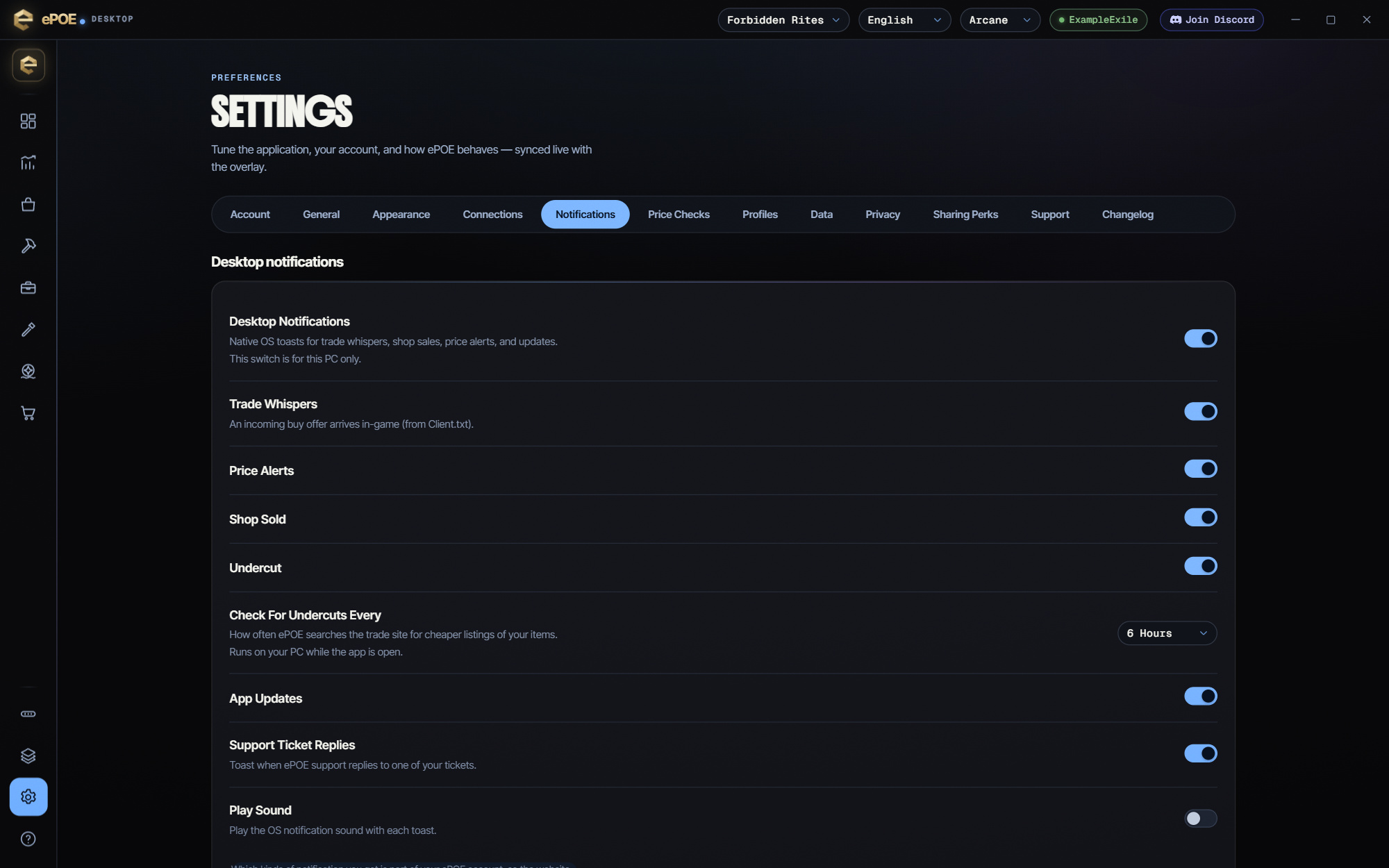
- Pick the kinds you want: Trade whispers, Price alerts, Shop sold, Undercut, App updates and Support ticket replies. Most kinds are part of your ePOE account, so the website and the app agree; Desktop notifications, Play sound and Support ticket replies are set per PC.
- Set Check for undercuts every — from 10 minutes to 24 hours, 6 hours by default. The checks run in the desktop app.
- Turn on Play sound (off by default) to hear your system's notification sound with each toast. App updates also covers the announcements the ePOE team broadcasts.
- The title-bar bell is the same inbox as epoe.io, with an unread count.
- Trade whisper toasts need Read Client.txt on under Settings → Price Checks → Behavior. Price alerts to your own Discord channel are set under Settings → Connections.
The bell and desktop toasts
Two layers, and the difference matters:
- The bell in the title bar is your inbox — the same one as on epoe.io. It shows an unread count, the newest items, and Mark All Read. Clicking an item marks it read and opens the page it is about.
- Desktop notifications are native operating-system toasts for the same events. The master switch, Play Sound (off by default) and Support Ticket Replies apply to this PC only.
What can notify you: Trade Whispers (an incoming buy offer, read from Client.txt), Price Alerts, Shop Sold, Undercut, App Updates and support replies. Undercut checks run from your PC while ePOE is open, as often as Check For Undercuts Every says. Which kinds you get is part of your account, so the website and the app always agree — turn one off in either place and it is off in both.
Nothing arriving? Check that Desktop Notifications is on, that Read Client.txt is on under Price Checks → Behavior for whispers, and that your operating system's notification settings allow ePOE.
Notifications
Which events notify you, whether this PC shows toasts, and Check For Undercuts Every — how often ePOE checks your shop for undercuts while it is open (10 minutes to 24 hours, 6 hours by default). Covered in the last section of this guide.
Try it in your next session
Start with the first action in the walkthrough, check the values and state the app shows, then continue with the settings that suit your character or workflow. Your own configured hotkeys and selected league take priority over an example in a screenshot.
Download ePOE · Read the current changelog · Browse the guides