 ePOE feature guide2 min read
Price check settings in ePOE: A Practical Guide
How price checks search and behave: the defaults for each check, league, realm and trade site, clipboard, stash-scroll and Client.txt behavior, and your Quick Upgrade profiles.


How price checks search and behave: the defaults for each check, league, realm and trade site, clipboard, stash-scroll and Client.txt behavior, and your Quick Upgrade profiles.
Where to start
Open Settings in ePOE Desktop. If your layout differs, use Help to search for Price check settings.
- Open Settings → Price Checks.
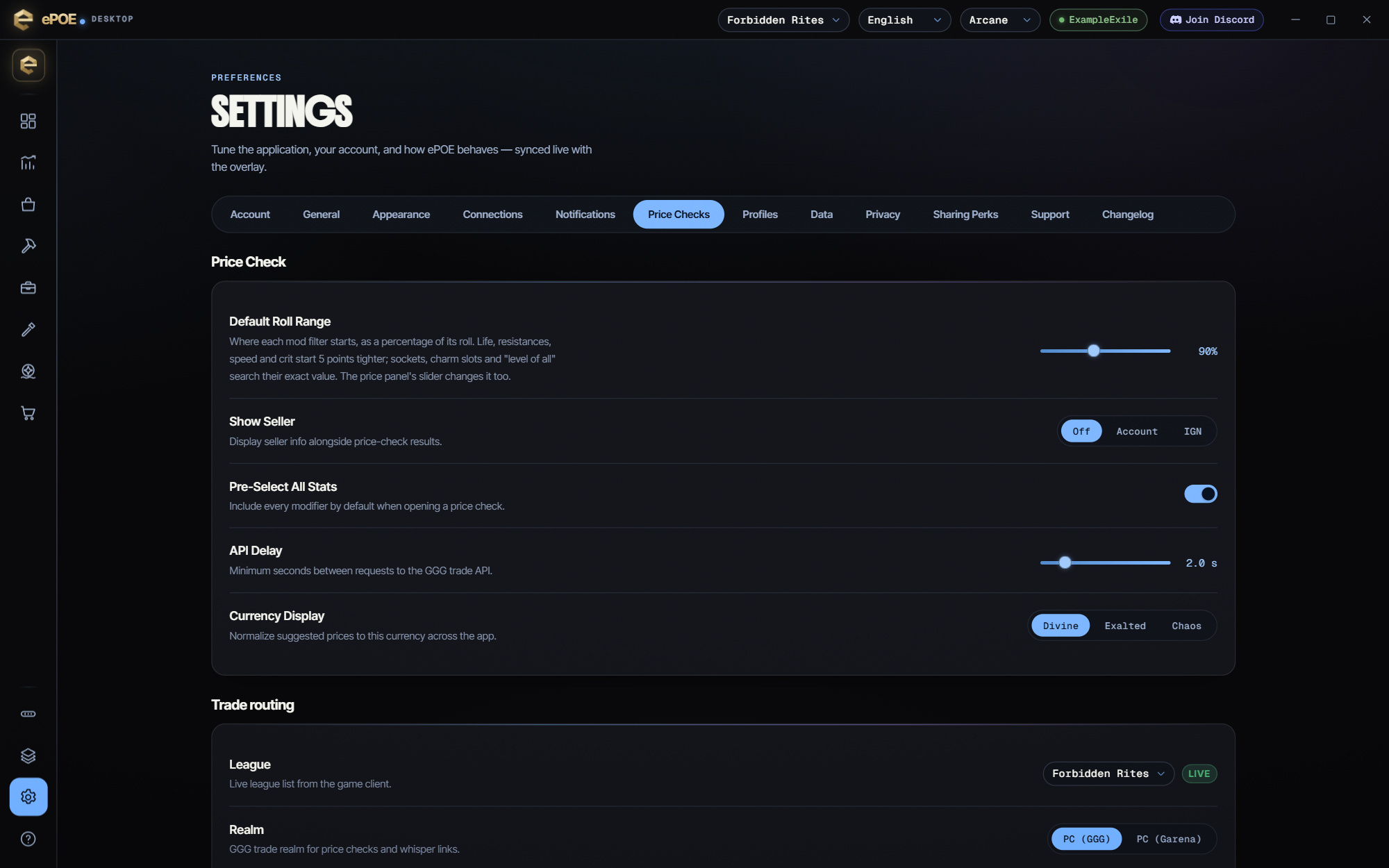
- Price Check: Default roll range sets where each mod filter starts, as a percentage of its roll — lower finds more listings, higher is stricter; the price panel's Roll range slider changes it too. Show seller, Pre-select all stats, API delay and Currency display sit beside it.
- Trade routing: pick the League, Realm and Trade site your searches use.
- Behavior: Restore clipboard after a copy, Close on game focus, Stash scroll (Left Alt+Scroll switches stash tabs), and Read Client.txt (on by default) for zone changes and trade whispers.
- Reset: Reset overlay settings → Reset to defaults.
- Quick Upgrade profiles: rename your imported weight profiles, make one the default, or delete one.
Price Checks
The tab most worth a visit. League and Realm decide where every search runs. Default roll range sets where each mod filter starts, as a percentage of its roll — lower it if checks come back empty. Life, resistances, speed and crit start 5 points tighter, and sockets search their exact value. The price panel's Roll range slider changes the same setting. Pre-select all stats, Show seller, API delay and Currency display tune the results. Under Behavior: Restore clipboard, Close on game focus, Stash scroll (Left Alt+Scroll flips stash tabs) and Read Client.txt, which live whispers and zone tracking need. Quick Upgrade profiles lists profiles you imported and which one is the default.
Profiles
Create Profile snapshots your price-check, trade and behavior settings under a name; Activate applies it. Pick a league in a profile's league picker (it starts as "Not bound to a league") and it applies automatically when you switch to that league. Hotkeys, league, language and your session are never part of a profile. Profiles are stored on this PC only and don't sync.
Try it in your next session
Start with the first action in the walkthrough, check the values and state the app shows, then continue with the settings that suit your character or workflow. Your own configured hotkeys and selected league take priority over an example in a screenshot.
Download ePOE · Read the current changelog · Browse the guides