 ePOE feature guide3 min read
Basic and Advanced price panel in ePOE: A Practical Guide
The price panel has two layouts, switched with its Basic / Advanced control: Advanced (the default) shows a row per mod with its own controls, and Basic shows a compact card.


The price panel has two layouts, switched with its Basic / Advanced control: Advanced (the default) shows a row per mod with its own controls, and Basic shows a compact card.
Where to start
The switch is on the price panel itself. Your choice is saved and follows your account through Cloud Settings Sync.
If you prefer a keyboard shortcut, check this feature’s current binding under Overlays → Hotkeys. Bindings can be changed, so use the one shown in your app.
- Price-check an item and find the Basic / Advanced switch on the panel.
- Advanced shows every mod row with its own Roll range slider, and the Filters rail with the Mod counts chips.
- Basic shows a compact card; press Evaluate to price the item.
- The global Roll range slider shows in both layouts; it hides only in Weighted mode.
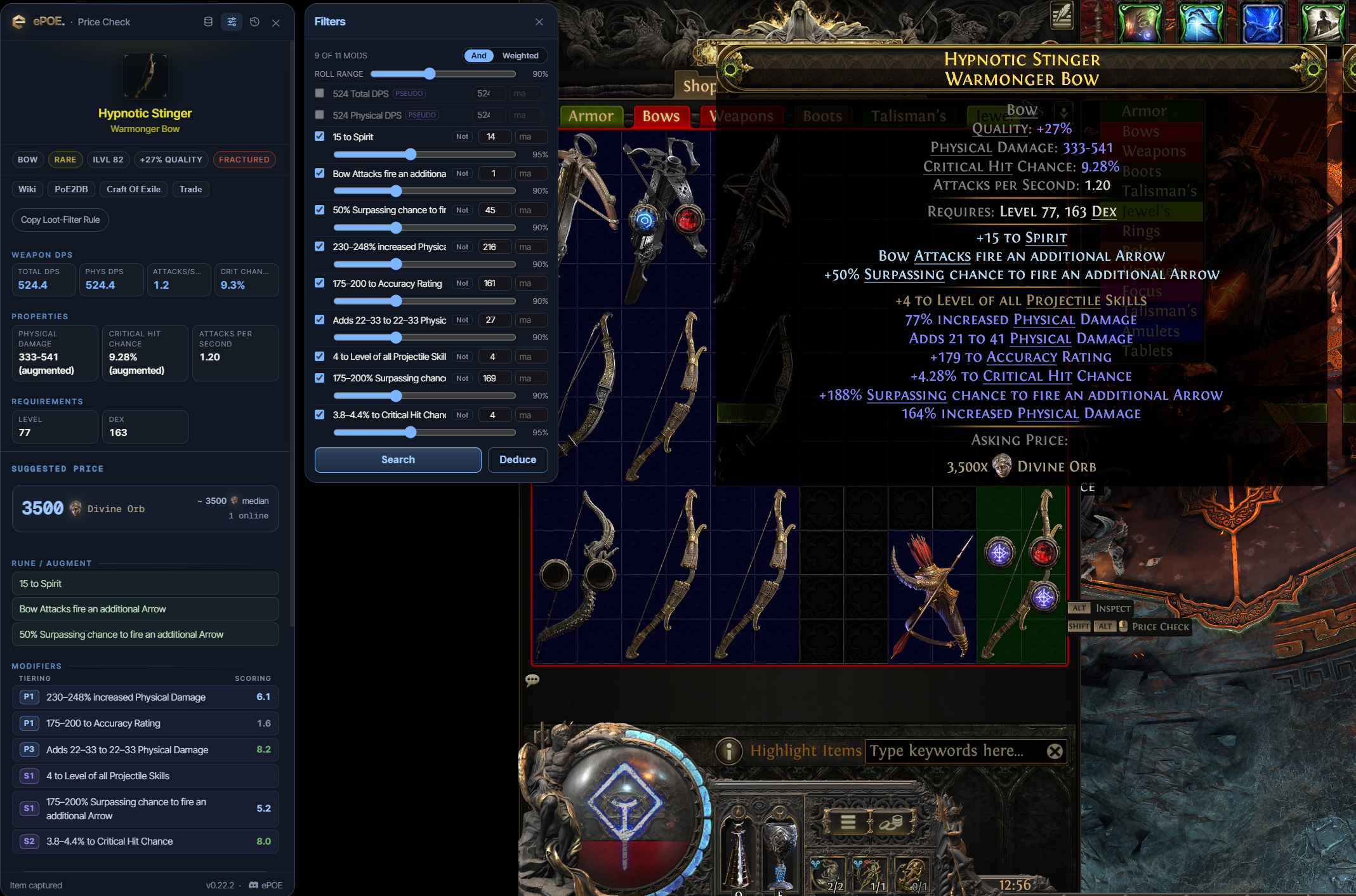
Rares: the mod filter panel
For a rare or magic item the mod panel opens automatically with a row per affix. Each row has a toggle and a min/max.
With Pre-select all stats enabled, supported stats start selected. Review those choices for the comparison you want:
- Turn off everything that does not sell the item. Life, resistances and your main damage stat sell items. A random `+3 to Stun Threshold` does not.
- Let the minimums sit below your rolls. For example, if your ring has 74 life, try a minimum of 70.
- You want comparable items rather than insisting on every exact roll; an exact search can have no matches. The roll range sliders below do this for you.
- Use And mode when you need every selected mod present. Use Weighted mode when you care about the total — a sum of resistances, or added damage across several mods — and do not mind which specific mods contribute.
Pseudo totals exist because that is how players actually shop. Some buyers need a particular resistance; others search for a total across elements. Choose specific filters or pseudo totals to match the requirement you actually have.
Mod-count filters
The Filters rail on the Advanced panel has a Mod counts row. Each chip requires at least your item's number of one kind of modifier: prefixes, suffixes, empty affixes, implicits, crafted, fractured, desecrated or unrevealed mods (and their prefix/suffix splits), uses remaining, and the number of resistances or elemental resistances. They are all off until you click one.
Use them for what the mod list cannot say: "a crafting base with an open prefix" is 1 Empty Modifiers; "a triple-resistance ring" is 3 Resistances.
The mod list also offers opt-in rows for total fire, cold and lightning resistance and total movement speed. Tick one when the total matters more than which mods add up to it.
Try it in your next session
Start with the first action in the walkthrough, check the values and state the app shows, then continue with the settings that suit your character or workflow. Your own configured hotkeys and selected league take priority over an example in a screenshot.
Download ePOE · Read the current changelog · Browse the guides


